Opaline is #8 on Product Hunt today with 139 points, pitched as "PostHog for team Claude Code and Codex sessions." A CLI hooks into Claude Code and Codex, uploads your session transcripts to a hosted dashboard, and the dashboard shows token cost, time and skill usage per message across a team. It used to be called Rudel.
The CLI is open source, so I built it, ran it in a sandbox against a mock server that records every request, and looked at what actually leaves the machine. The dashboard I did not run. Everything below is about the CLI and the data it sends.
What it is
The repository, opalinehq/cli, is a TypeScript monorepo: MIT, @opalinehq/cli 0.10.0, Node 20 or newer, built with bun. I tested commit f549c07 (2026-09-19). The README says plainly that the repo holds the CLI only and that it connects to "the Opaline app" at opaline.so. The server is closed; a comment in the CLI's own test helpers says anything asserting real ingest behaviour "belongs in the private API repository."
Product Hunt describes deployment as "cloud-hosted or self-hosted/on-premise." The pricing page puts on-prem in Enterprise, from $85 per member per month plus a $1,000 annual platform fee. The free tier is 3 members and 50,000 agent runs a month.
Flow: run npx opaline@latest, pick repositories, review, confirm. It installs a SessionEnd hook in ~/.claude/settings.json and uploads new sessions when they end, plus the sessions that already exist for the repositories you enabled.
Setup
Windows 11, Node 24.11.1, Git 2.53. No install step for the product itself, but the repo pins bun@1.3.10 and I used 1.4.2.
git clone https://github.com/opalinehq/cli && cd cli
bun install          # 38 packages, 7 s
bun run build        # apps/cli/dist/cli.js, 972 KB
node apps/cli/dist/cli.js --version   # 0.10.0
The upstream suite is 782 tests. On Windows, bun test in apps/cli gives 770 pass, 2 skip, 10 fail. I read each failure. Every one is a Windows or POSIX assumption, or my environment:
import/agentstests build POSIX paths (/, a:PATH separator, a drive letter pasted into a directory name).- Three tests assert
0o700on the config directory and get0o666, which is what Node reports for chmod on Windows. That means the "private local state" permission tests can't pass here. I did not look at the actual ACLs. - Path-separator comparisons in
upload-chokepointandrepository-discovery. - One integration test spawns
bunby name and could not find it from my shell.
A trap if you install bun through npm: the shim is bun.cmd, and four upstream tests fail on it with contains a cmd.exe special character until you put the real bun.exe on PATH. The integration suite's own comment says it runs in a Linux job, so I read the Windows failures as an untested platform, not a broken one.
How I tested it
Nothing here touches my real sessions, ~/.rudel or opaline.so. The harness (ph-tests/opaline/) builds a sandboxed HOME, writes synthetic Claude Code sessions, and points OPALINE_API_BASE at a mock server on 127.0.0.1 that answers the RPC calls and records every request. The runner uses DO_NOT_TRACK=1 throughout, so I did not observe the PostHog analytics path at all.
Two drivers:
- Plain runs of
node dist/cli.js import <file>for the payload and filter tests. - The real
opaline uploadpicker in a pseudo-terminal (Bun.spawnwithterminal, screen state kept by@xterm/headless), pressing the keys a person would.
The scenarios are in opaline.feature; opaline.test.ts and tui.test.ts implement them. 36 tests, all passing on the final run.
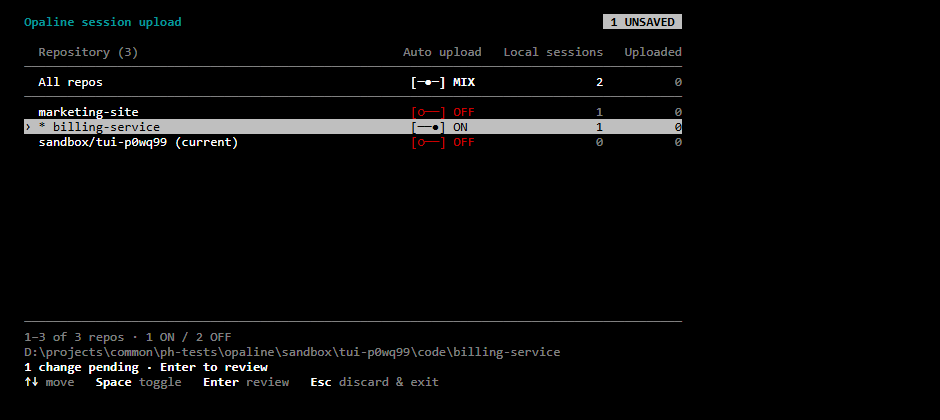
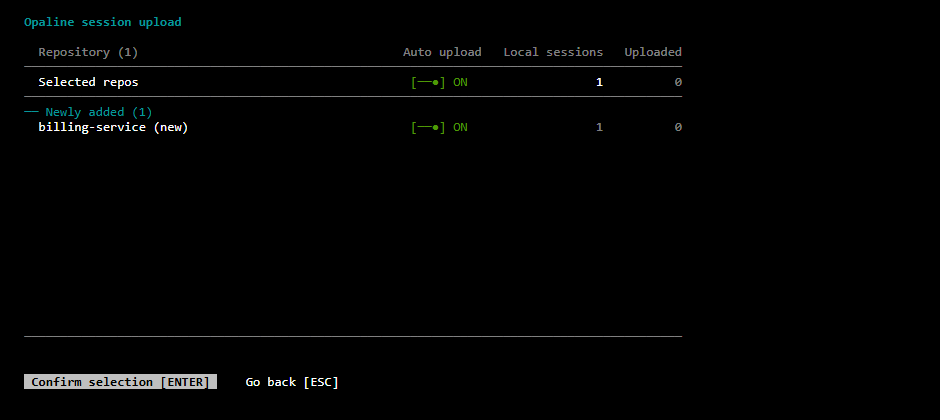
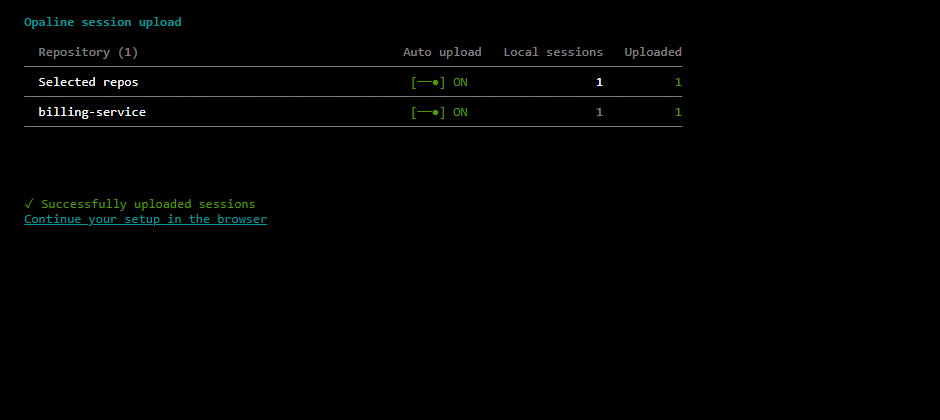
These are captures of the real TUI in a sandbox, rendered from the terminal's screen buffer.
What's good about it
- Nothing uploads until you say so, in three steps. Every repository starts OFF. Toggle, review, confirm. In my run, only the repository I toggled uploaded (
sess-billing-1); the other repository's existing session stayed local. - OFF actually stops it. I fired the installed hook command for a new session in the enabled repository and it uploaded (
upload_mode: "hook"). A new session in a repository I never enabled uploaded nothing. After toggling the first repository OFF in the picker, its next session uploaded nothing either. The negative results are paired with the positive one, so a broken hook can't fake them. - It keeps your other settings. I pre-seeded
settings.jsonwith amodelkey and an unrelatedStophook. Both were still there after setup, next to the newSessionEndentry ("async": true). - What it tells the server about your repositories is narrow. Across three
repositorySettings/reportcalls the body was an installation UUID plus, per repository I had toggled, a key (remote:github.com/example-org/billing-service), a name andenabledordisabled. The repository I never toggled appears in no request body exceptsessionUploadStatus, which is a batch of session IDs checking what is already uploaded. - The docs are candid.
docs/data-handling.mdopens with "Opaline uploads full coding-agent session transcripts" and says filtering "cannot guarantee that every sensitive value is removed." The tests below agree with it.
What I'd push back on
The filter is 18 patterns, and Claude Code sessions are full of .env files
Before upload the CLI runs a secret filter (internal/secret-filter), generated from the Gitleaks v8.30.1 config: AWS access key IDs, GitHub, GitLab, Anthropic, OpenAI, Stripe, Slack, SendGrid, Twilio SK... keys, npm tokens, Google API keys and PEM private keys. I put one fabricated credential of each shape in a Bash tool result, the way cat .env would show up, and imported the session.
| Credential in the session | Sent to the server |
|---|---|
| AWS access key ID | [REDACTED:aws-access-key-id] |
| GitHub personal access token | redacted |
| Anthropic API key | redacted |
| Stripe live secret key | redacted |
| Slack bot token | redacted |
| PEM private key | redacted |
| AWS secret access key (40 chars) | verbatim |
| Postgres URL with password | verbatim |
SMTP_PASSWORD=... | verbatim |
| JWT (Supabase service role style) | verbatim |
Authorization: Bearer ... | verbatim |
| Hugging Face token | verbatim |
| Twilio auth token (32 hex) | verbatim |
Six of six covered shapes were redacted; seven of seven uncovered ones went out as written. That is what the docs say, and it is still the part to read before enabling a repository: "known secret patterns" means this list. I expect one common way secrets reach an agent transcript is a file the agent read, and files hold passwords and connection strings that no vendor-prefix regex can see.
The AWS pair is the concrete example. Two adjacent lines:
aws_access_key_id = [REDACTED:aws-access-key-id]
aws_secret_access_key = kOtSLC0pGdGeKok9SficJCWXcDwGuHh3uU5GRWPt
The ID is masked; the secret that makes it useful is not. The values are fabricated. I generated them with a seeded PRNG (my first generator produced near-constant strings, so I replaced it and reran everything; the results did not change).
Some covered keys still get through, depending on the next character
Several rules end with a required terminator: whitespace, a quote, a backtick, a semicolon, an escaped \n, or end of input. That is how the Gitleaks patterns are written. It means the character after the key matters. I called the same filterKnownSecrets function the CLI uses with key=<secret><trailer>x:
| Character after the key | Anthropic key | Stripe key | GitHub token |
|---|---|---|---|
space, newline, ", ; | redacted | redacted | redacted |
, ) & . : / | sent | sent | redacted |
The GitHub rule has no terminator, so it is unaffected. Quoted keys ("sk-ant-...") and a key at the end of a line are caught, which covers most real occurrences. A key in an unquoted URL query string or an argument list followed by a comma is the case that slips. It's rarer than the missing rules above, and silent.
Two limits on all of this. First, a comment in filter.ts says the API filters again on its side; the API is closed and I could not see what it does, so the hosted result may be better than what leaves your machine. Second, my mock does not advertise the "direct R2 ingest" upload path, so the tests exercise the legacy ingest path. The docs say filtering applies to both, and the hook payload carries filter_version: 5, but I did not push secrets through the hook path or the R2 path.
There are safeguards worth naming, from reading the source: the filter reruns until a pass changes nothing (up to four passes), refuses to upload if redaction would break the transcript's JSON, and stops if it would redact more than 20% of the payload. I did not test those.
The payload is the whole transcript plus where it came from
The ingest body carries the full JSONL content (prompt, tool calls, tool output, replies), and alongside it the absolute local path, the git remote, the branch and the commit SHA:
{
  "source": "claude_code",
  "sessionId": "sess-billing-1",
  "projectPath": "D:\\projects\\...\\code\\billing-service",
  "gitRemote": "github.com/example-org/billing-service",
  "gitBranch": "main",
  "gitSha": "84fc58da93b14044e52297d253c631a1cf2a46c9",
  "organizationId": "org-mock",
  "upload_mode": "hook",
  "content": "[907 chars]",
  "filter_version": 5
}
The absolute path usually includes your OS username. The usage-analytics section of the docs says its events exclude local paths; the ingest request itself is a different channel and does include one. That is documented under "repository metadata" but easy to miss.
Nothing else went to the API in my runs. The full list of endpoints across the terminal suite: sessionUploadStatus (4), authStatus (1), setupStatus (1), repositorySettings/report (3), ingestSession (2). I also ran whoami and doctor against the mock. doctor reported the mock's health response as invalid, which is expected, and its version line comes from registry.npmjs.org (cli-release.ts); I saw the output, not the request.
On Windows, import by file path can't recover the project
The picker reads the working directory from inside the session file and gets it right (the payload above). But opaline import <file> decodes the project from the directory name, and the Claude adapter's decodeProjectPath assumes POSIX. Claude Code on Windows names the directory D--projects-.... Result for a real repository at D:\...\billing-service:
"projectPath": "/D//projects/common/ph/tests/opaline/sandbox/suite/.../code/billing/service"Hyphens in the repository name became separators and no gitRemote or gitBranch was found. Only the manual import path is affected; hooks receive the working directory from Claude Code, and the picker uses the file's own cwd. I hit it with a single sandbox path, so I can't say how it behaves for every layout.
Smaller things
- The hook uses an absolute Node path and a private copy of the CLI. The installed command is
'C:\...\node.exe' '...\.rudel\runtime\cli.js' hooks claude session-end. It does not usenpx, so it does not depend on the runner cache, and updates go throughopaline update. The single quotes are POSIX;cmd.execannot run it. I ran it through Git Bash. Claude Code itself never fired it in this test. - "Open source" is the CLI. The dashboard, the ingest server and the analytics are not in the repository.
What I did not test
- The hosted app: no dashboard, no cost or skill-usage numbers, no account.
- PostHog analytics (opt-out set throughout; the source build is unconfigured by default, and I did not test the npm release).
- Codex sessions, the R2 direct-upload path, the
--classifyoption (it sends the first 50,000 bytes of the transcript toclaude --model haikulocally, fromclassifier.ts), andopaline update. - Claude Code firing the hook itself.
- macOS and Linux.
Verdict
If you want session analytics for a team, the CLI is a careful piece of consent UX: off by default, nothing sent until you confirm, OFF really means OFF, and it leaves your other hooks alone. The engineering around uploads is more thoughtful than most of what I've read in this category.
What you are consenting to is the whole transcript, tool output included, with a secret filter that handles 18 known token shapes. Passwords in a .env, connection strings, the AWS secret next to a redacted key ID, and any key followed by a comma go through unchanged. Run it on repositories where sessions never read secrets, or where you already keep secrets out of the agent's reach, and treat the filter as a backstop. Turn on one repository first and read what it uploaded.
Reproduce it: ph-tests/opaline/ holds opaline.feature, opaline.test.ts, tui.test.ts, lib.ts, secrets.ts, tui.ts and render-shots.ts. Clone the CLI at f549c07 into opaline-cli/, build it, put bun.exe on PATH, then bun test opaline.test.ts tui.test.ts and bun render-shots.ts.
Sources: Opaline on Product Hunt · opaline.so · pricing · opalinehq/cli at f549c07 (README.md, docs/data-handling.md, docs/usage.md, internal/secret-filter/, lib/uploader.ts, commands/import.ts, internal/agent-adapters/adapters/claude-code/index.ts)