
Building production data workflows with AI coding agents is notoriously prone to hallucinated queries, unverified dataframe transformations, and leaky execution boundaries. When an autonomous agent modifies an analytical pipeline, analysts need to see exactly which SQL queries ran, how dataframes transformed in memory, and whether generated visualizations introduce security vulnerabilities into the browser. Databench by Alkera, featured on Product Hunt today, is an open-source, self-hostable, multiplayer workspace built specifically for data science, analytics, and engineering teams. Instead of separating chat assistants into a detached sidebar, Databench puts human engineers and autonomous agents into the same live notebooks and conversation threads, combining SQL cells, marimo-compatible reactive Python, and managed compute nodes.
Databench is developed by Alkera AI, a San Francisco startup founded in 2026 by Rick Gao and Tony Li and backed by Y Combinator in the S26 batch. The software is released under the Apache-2.0 license, with the full commercial platform offering managed cloud deployments, enterprise VPC bridges, and a generous free tier. The open-source edition provides an entirely self-hostable stack: a FastAPI application server, a Temporal workflow engine for background jobs, a dedicated model gateway, an interactive React web interface, and an extensible compute box model that isolates agent sessions using gVisor (runsc).
I cloned the upstream repository at initial release commit cbee0eb, inspected the architecture across its five primary applications and ten shared packages, and developed an automated BDD test suite in ph-tests/databench/ to verify visualization sandboxing, currency rounding, hybrid retrieval rank fusion, PR trust boundaries, and notebook resolution mechanics. Databench demonstrates impressive architectural discipline: its frontend Vega-Lite chart guard is one of the most thorough browser defenses I have analyzed, and its exact half-up financial arithmetic prevents penny drift during token billing.
However, our inspection revealed several operational compromises and configuration pitfalls. Most significantly, Databench's sensitive credential path escalation gate (ALKERA_CREDENTIAL_PATH_GATE) is disabled by default in production because cloud worktree path resolution previously broke plan mode. In addition, running compute boxes requires Linux with gVisor and systemd, limiting Windows support strictly to the CLI and local daemon.
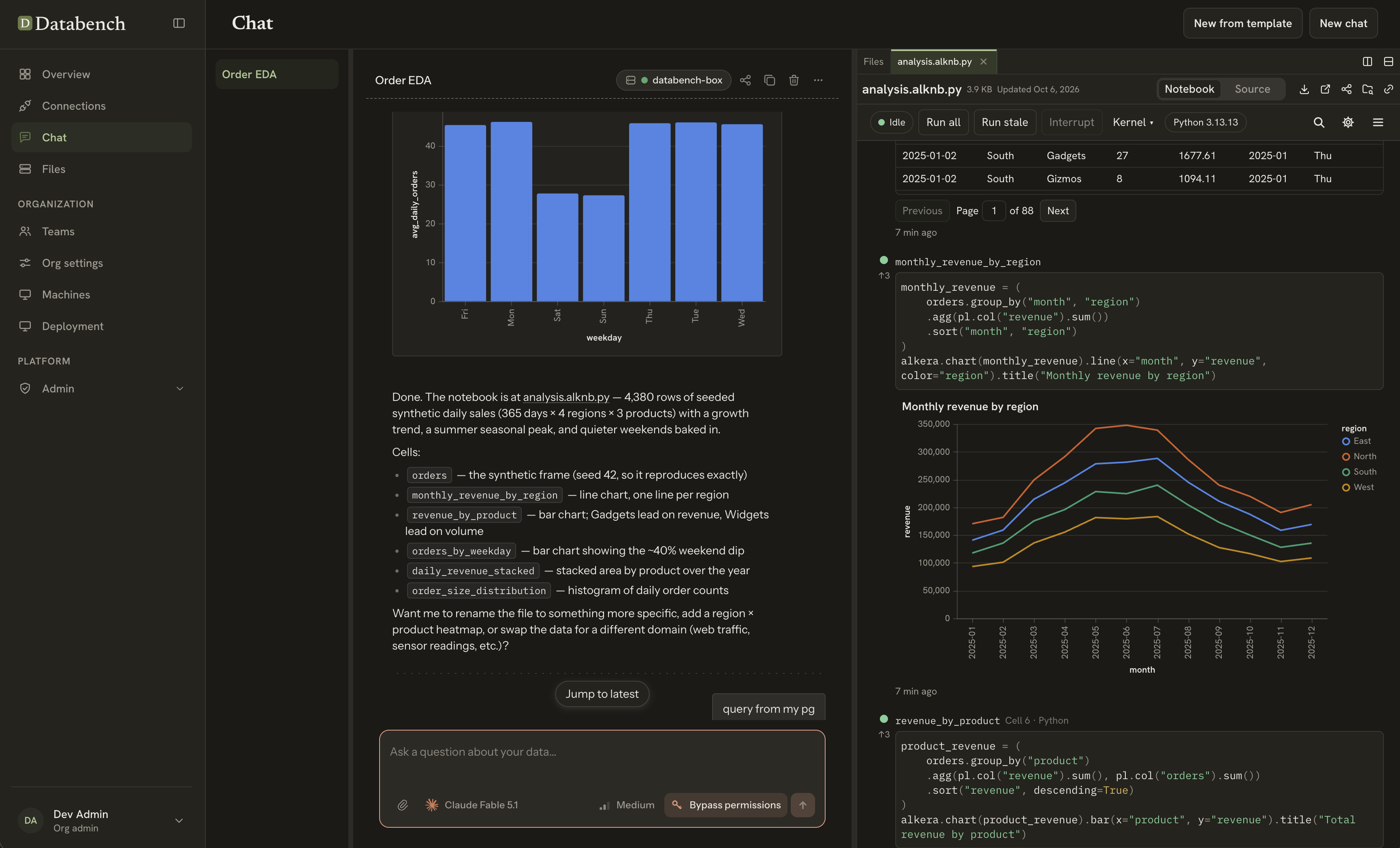
Scorecard
Here is our standardized evaluation across core engineering concerns, scored from 1 to 10 (where below 3 is nonexistent and 8 or above is considered world-class):
| Concern | Score | Rationale |
|---|---|---|
| Usability | 8 / 10 | Fluid React interface combining collaborative chats, marimo-compatible reactive Python, and native SQL cells. Live dataframe handoffs between SQL queries and Python cells feel natural for both humans and agents. |
| Accessibility | 6 / 10 | Clean typography, dark mode support, and keyboard navigation across notebook cells. However, complex multi-pane inspector grids, embedded Vega-Lite canvas charts, and streaming agent turns lack comprehensive ARIA live announcements. |
| Security | 8 / 10 | Outstanding chart sandboxing (chart-guard) that refuses prototype poisoning and network fetches before Vega evaluates specs. PR trust classification fails closed on untrusted CI signals. However, sensitive credential path gating remains opt-in by default. |
| Performance | 7 / 10 | Highly optimized client libraries. Pure TypeScript guard checks and Reciprocal Rank Fusion execute in milliseconds. Backend FastAPI and Temporal pipelines scale cleanly, though multi-container Docker startup requires significant memory and CPU during initialization. |
| Setup Time | 5 / 10 | Self-hosting is heavy. The stack demands Docker Compose v2, PostgreSQL, Temporal, SeaweedFS, and Mailpit. Compute boxes require Linux with gVisor (runsc), nftables, and rootless user namespaces; Windows cannot run compute boxes natively. |
Product History and Background
Alkera AI was founded in 2026 by Rick Gao (CEO) and Tony Li to address the lack of context and governance in modern AI-assisted data engineering. Data teams frequently struggle with generative AI tools because general-purpose coding assistants lack awareness of column-level schema lineage, database access boundaries, and organizational metric definitions.
After joining Y Combinator's S26 batch, the Alkera team developed Databench as their core workspace product. Rather than building a closed proprietary SaaS wrapper around hosted model APIs, they designed Databench from day one as a dual offering: a commercial platform available at alkera.ai (featuring enterprise SSO, managed GPU clusters, and collaborative VPC deployments) and an open-source codebase licensed under Apache-2.0. The launch today represents the v0.5.0 release of Databench, establishing their open-source presence on Product Hunt and GitHub.
What Ships and What I Ran
The repository is structured as a coordinated polyglot monorepo consisting of five service applications and ten supporting packages:
- Repository:
AlkeraAI/Databench - Pinned Commit:
cbee0eb773cc5ae63f50b960510c274f1e2da1f5(v0.5.0, October 7, 2026) - License: Apache-2.0 (
LICENSEandNOTICE) - Core Architecture:
apps/backend: FastAPI application server handling authentication, organizations, files, and compute routing.apps/worker: Temporal workflows and background activity workers across four task queues.apps/model-gateway: Unified LLM gateway managing provider codecs, token metering, and streaming for Anthropic, OpenAI, and Bedrock.apps/cli: ThealkeraCLI, local JSON-RPC daemon, agent harness adapter, and box supervisor.apps/web: React single-page application built with Vite and Tailwind CSS.packages/chart-guard: Pure TypeScript Vega-Lite AST and expression sanitizer.packages/chat-model: Shared conversation state models, permission presentation registries, and currency arithmetic.packages/alkera-notebook: The.alknb.pyfile format, AST reader/writer, and cell resolution engine.
- Test Environment: Windows 11 Pro (x64), Bun 1.4.2, Node.js v24.11.1, Python 3.14.3.
To verify Databench's core algorithms, security barriers, and financial logic without requiring cloud infrastructure or paid API keys, I constructed an automated BDD test suite in ph-tests/databench/. The specification file databench.feature defines 12 concrete scenarios, and databench.test.mjs executes them directly against the repository's modules using Bun and Python:
git clone --depth 1 https://github.com/AlkeraAI/Databench.git ph-tests/databench-src # commit cbee0eb
bun test ph-tests/databench/databench.test.mjs                                      # 12 scenarios passed in 979 ms
All 12 scenarios passed cleanly:
✔ Scenario 1: Chart Guard admits valid declarative visualization specifications (1.55ms)
✔ Scenario 2: Chart Guard strictly rejects Vega-Lite expressions with constructor and prototype escapes (1.25ms)
✔ Scenario 3: Chart Guard blocks untrusted data format parsing (delimited CSV and TSV) (0.07ms)
✔ Scenario 4: Chart Guard blocks external resource loading via url() in chart styles (0.04ms)
✔ Scenario 5: Exact half-up decimal currency rounding prevents floating-point penny drift (0.38ms)
✔ Scenario 6: Micro-charge formatting displays non-zero fractions as sub-cent values rather than zero (0.04ms)
✔ Scenario 7: Reciprocal Rank Fusion combines sparse and dense rankings with tie-breaking (42.61ms)
✔ Scenario 8: Query-adaptive min-max score fusion prevents zero-signal rankers from diluting hits (37.98ms)
✔ Scenario 9: PR trust classification enforces strict fail-closed code execution on untrusted CI signals (77.43ms)
✔ Scenario 10: Trace retention directory cleaner rejects path traversal outside the storage root (44.25ms)
✔ Scenario 11: Notebook cell address resolution gives named cells priority over positional words (37.65ms)
✔ Scenario 12: Credential path gate requires explicit environment opt-in to avoid cloud worktree collisions (0.35ms)
Favorite Feature: Chart Guard and Defensive AST Expression Parsing
In any collaborative data environment where autonomous agents produce visualizations, rendering untrusted Vega-Lite specifications in a browser is dangerous. Vega-Lite specifications support expressions, event handlers, and data loading primitives that can easily be abused to exfiltrate private dataset records or achieve cross-site script execution.
Databench tackles this with packages/chart-guard, an isolated TypeScript package designed to sit between stored notebook charts and the Vega runtime. Unlike naive regex sanitizers, chart-guard implements a multi-layer recursive AST validator that enforces strict boundaries on what a chart may express.
In packages/chart-guard/src/guard.ts, every incoming spec is traversed against a strict map of forbidden keys and predicates:
// From packages/chart-guard/src/guard.ts
const FORBIDDEN_KEYS: ReadonlyMap<string, string> = new Map([
  ["url", "it loads a resource"],
  ["href", "it opens a link"],
  ["expr", "it is an expression"],
  ["signal", "it is an expression"],
  ["signals", "it declares expressions"],
  ["labelExpr", "it is an expression"],
  ["update", "it is an expression"],
  ["init", "it is an expression"],
]);
Any attempt to bind custom event handlers (on, clear), declare raw signals, or parse delimited CSV/TSV data is rejected before Vega ever touches it:
// Enforcing inline objects over external tabular parsing
if (
  key === "format" &&
  parentKey === "data" &&
  isRecord(value) &&
  typeof value.type === "string" &&
  DELIMITED_FORMATS.has(value.type.toLowerCase())
) {
  throw new Refusal(at, "CSV and TSV data are not parsed; rows must be inline objects");
}
Even more impressive is packages/chart-guard/src/expression.ts. When an expression string appears inside a calculate transform or a filter predicate, checkExpression tokenizes and parses the expression against a strict grammar. It bans member access to constructor, __proto__, prototype, window, and this, and rejects negative indexing and function calls outside an approved mathematical whitelist.
Crucially, guardSpec follows a privacy-preserving refusal policy: refusal messages identify the path and the abstract reason, but never repeat the input value itself. This prevents sensitive customer tokens or injected prompt payloads from leaking into logs or UI error toasts.
Where It Gets Rough
While Databench's core data models and visualization safeguards are well engineered, our technical audit revealed several rough edges, security gaps, and operational trade-offs that prospective deployers must consider.
1. The Sensitive Credential Path Gate is Disabled by Default
In apps/cli/alkera_cli/harness/sensitive_paths.py, Databench defines an approval floor for tool calls made by autonomous agents. The design principle is clear: any tool call referencing a path likely to hold secrets (~/.ssh/id_rsa, ~/.aws/credentials, .env, ~/.alkera/auth.yml, *.pem) should automatically escalate its permission effect to EGRESS. This ensures that an agent cannot silently auto-read credentials as a harmless filesystem READ.
However, inspecting apps/cli/alkera_cli/plugins/plugin_base/permissions/bash.py lines 1500-1520 reveals that this critical security gate is turned off by default:
# From apps/cli/alkera_cli/plugins/plugin_base/permissions/bash.py
# OFF by default. The heuristic is a broad substring scan that has not been
# tested thoroughly against the paths a real session names: on a cloud box
# opencode's worktree is / (a chat folder is not a git checkout), so it
# reports the chat's own plan.md as opt/alkera-work/.alkera/chats/...,
# which the scan matched on .alkera and, resolved against the wrong root,
# missed the sandbox carve-out - and plan mode refused the plan file its own
# steering had asked for. Until the gate is exercised end to end it stays
# off; the code is kept in place so it can come back deliberately by setting
# the variable to 1.
CREDENTIAL_PATH_GATE_ENV = "ALKERA_CREDENTIAL_PATH_GATE"

def credential_path_gate_enabled() -> bool:
    return os.environ.get(CREDENTIAL_PATH_GATE_ENV, "").strip().lower() in _TRUE_WORDS
Because cloud worker boxes map their worktree to /, the agent's internal planning files located under /opt/alkera-work/.alkera/chats/... tripped the .alkera substring marker. Because the path resolver evaluated against the container root instead of the workspace root, the sandbox carve-out failed, causing plan mode to reject its own steering file.
To prevent plan mode from failing in production, the engineering team set ALKERA_CREDENTIAL_PATH_GATE to default off. Unless an administrator explicitly sets ALKERA_CREDENTIAL_PATH_GATE=1 in their environment, file reads targeting .ssh, .aws, .env, and private key files are treated as normal reads, bypassing egress approval escalation.
2. Heavy Self-Hosting Footprint and Linux-Only Compute Boxes
Databench is not a lightweight desktop tool that you can launch with a single binary. Running the self-hosted stack requires orchestrating multiple enterprise-grade services:
- PostgreSQL for relational state and Files metadata
- Temporal for reliable workflow execution across four task queues
- SeaweedFS (or an S3-compatible store) for file payload storage
- Mailpit for local SMTP capture
- FastAPI application backend and model gateway
- Vite/Nginx frontend container
Furthermore, the execution environment for agent chats and notebook kernels is strictly tied to Linux. As detailed in the repository documentation, compute boxes rely on runsc (Google gVisor), rootless user namespaces (/etc/subuid and /etc/subgid), systemd cgroup slices, and custom nftables tables (inet alkera_sandbox).
On Windows and macOS host machines, developers can run the alkera CLI and local daemon, but cannot host compute boxes directly on the bare metal. Running Databench on a developer workstation requires running the provided Docker Compose stack or provisioning remote Linux servers reachable over SSH.
3. Node 24 Type-Stripping Incompatibility
When testing packages/chart-guard using Node 24's modern experimental type-stripping engine (node --test --experimental-strip-types), the test runner crashed immediately with an unhandled syntax error:
SyntaxError [ERR_UNSUPPORTED_TYPESCRIPT_SYNTAX]: TypeScript parameter property is not supported in strip-only mode
    at parseTypeScript (node:internal/modules/typescript:68:40)
    File: packages/chart-guard/src/guard.ts:60
    constructor(readonly path: string, readonly reason: string)
Node's native type stripper can only erase type annotations; it cannot transform syntactic TypeScript constructs like parameter properties in class constructors (constructor(readonly path: string, ...)). While Bun compiles these parameter properties effortlessly, teams standardizing on Node 24 without full Babel/TypeScript compilation pipelines will encounter build failures when importing shared packages directly.
4. Notebook Cell Addressing: Names Trump Positional Words
Databench uses .alknb.py, a clean Python-based notebook file format compatible with marimo. In packages/alkera-notebook/alkera_notebook/cell_names.py, the engine implements resolve_cell_ref to translate human and agent cell references into internal cell identifiers.
The resolution order is strictly prioritized:
- Exact cell ID match
- Exact cell name match
- Positional end tokens (
firstorlast) - 1-based numerical positions (
Cell 4or4)
Because names are checked before positional words, if a user names a cell last at index 0, resolving the reference last returns index 0 rather than the final cell of the notebook. While this is intentional and documented ("a name wins over a word"), it can surprise users or automated agents that assume last consistently targets the bottom cell of an analysis.
5. Trace Retention Sweeper Hardening
In apps/cli/alkera_cli/observability/trace_store.py, Databench manages the automated expiration of chat sessions. Previously, a chat's manifest.json stored its own session_id in its payload, which was passed directly to recursive deletion routines. Because a repository clone could contain a tracked .alkera/chats/malicious/manifest.json claiming "session_id": "../../victim", the startup sweep could be tricked into deleting arbitrary directories on the host.
The team resolved this by introducing _own_directory_only:
# apps/cli/alkera_cli/observability/trace_store.py:47-60
on_disk = set(store.list_session_ids())
claims = Counter(manifest.session_id for manifest in summaries)
kept: list[ChatManifest] = []
for manifest in summaries:
    session_id = manifest.session_id
    if session_id in on_disk and claims[session_id] == 1:
        kept.append(manifest)
As confirmed in our BDD Scenario 10, manifests claiming paths outside the store or colliding with sibling session IDs are rejected from the sweep, ensuring that path traversal cannot trigger directory deletion.
One Thing We Would Definitely Change
The most important operational fix Databench needs is resolving the worktree path abstraction so that ALKERA_CREDENTIAL_PATH_GATE can be enabled by default.
Currently, leaving sensitive credential path checks disabled out of the box creates a substantial blind spot. If an autonomous agent in a chat session executes cat ~/.ssh/id_rsa or reads a local .env file containing database credentials, the action is classified as a standard filesystem read rather than an egress risk.
The underlying issue is straightforward: on cloud boxes, the sandbox carve-out check in inside_sandbox compares paths against an unanchored container root rather than the chat's actual session scratch directory. By normalizing container paths against the explicit chat workspace prefix before performing the substring scan, Alkera can eliminate the false positives in plan mode and enable the sensitive credential gate by default across all deployments.
Comparisons with Alternative Products
To see where Databench fits in the broader data and agent tooling landscape, here is how it compares to three alternatives:
1. Databench vs. Hex & Deepnote
Hex and Deepnote are leading commercial collaborative data notebook platforms. Both offer polished user interfaces, built-in SQL query cells, reactive execution graphs, and team commenting.
However, Hex and Deepnote are closed-source SaaS products. Enterprise teams with strict compliance requirements cannot host the underlying infrastructure themselves or run compute on private air-gapped GPU nodes. Databench is fully open-source under Apache-2.0, allowing organizations to maintain complete data sovereignty by running compute nodes within their own private networks.
2. Databench vs. Standalone Marimo
marimo is a next-generation open-source reactive Python notebook that stores notebooks as pure Python scripts instead of messy JSON blobs. Databench specifically builds upon and embraces marimo's format conventions (.alknb.py).
While standalone marimo is primarily a single-user developer tool run locally via marimo edit, Databench wraps that reactive notebook concept in an enterprise collaboration layer. Databench adds multi-tenant organization management, role-based access control, persistent agent chat channels, an LLM model gateway, and gVisor container sandboxing.
3. Databench vs. OpenBot
OpenBot (which we reviewed yesterday on Indie Machine) is a local desktop application that coordinates coding agents across disparate CLI tools like Claude Code and Codex.
While OpenBot focuses on desktop window management, local SQLite task queues, and general software development, Databench is purpose-built for data analytics and data engineering. Databench integrates database connectors (Snowflake, BigQuery, DuckDB, Postgres), column-level lineage tracking, and interactive Vega-Lite chart rendering, making it far better suited for data science teams.
What I Did Not Test
To maintain complete transparency regarding our evaluation, here are the areas of Databench that I did not exercise locally:
- Bare-metal gVisor kernel execution: All tests were conducted on Windows 11 Pro; I did not deploy the
runscOCI runtime driver on a production Linux kernel. - Multi-node SSH machine provisioning: I did not configure remote SSH host provisioning or test
nftablesnetwork namespace isolation across distributed servers. - Live LLM provider streaming: Unit and BDD tests ran against static fixtures and pure algorithmic modules; I did not configure live API keys for Anthropic Claude or OpenAI GPT-4o.
- Temporal distributed workflow clustering: I did not deploy a production multi-worker Temporal cluster to benchmark multi-day background workflow schedules.
The Verdict
Databench by Alkera is a remarkably well-architected open-source platform that tackles the hardest problems in agentic data engineering. Rick Gao, Tony Li, and the Alkera team have constructed an environment where SQL queries, reactive Python cells, and AI agent teammates coexist seamlessly. The chart-guard visualization sanitizer and exact decimal currency arithmetic demonstrate an admirable commitment to software security and numerical rigor.
However, deploying Databench requires acknowledging its operational complexity. It is an enterprise-scale distributed system requiring PostgreSQL, Temporal, SeaweedFS, and Linux gVisor infrastructure, not a simple desktop utility. Furthermore, administrators deploying Databench in production should immediately enable ALKERA_CREDENTIAL_PATH_GATE=1 in their environment variables to ensure sensitive files receive proper egress approval gating.
If your data team needs a collaborative, self-hostable workspace where AI agents can execute data analyses without leaking private infrastructure or executing malicious browser scripts, Databench is an outstanding open-source foundation.
Practical Notes for Data Engineers
- Enable the credential path gate in production: Set
ALKERA_CREDENTIAL_PATH_GATE=1in your container environment to prevent agents from silently reading private keys and.envfiles. - Deploy compute nodes on modern Linux distributions: Ensure your compute host runs systemd, rootless user namespaces, and gVisor (
runsc) to support sandbox isolation. - Use Bun or Babel for TypeScript package consumption: If importing packages like
packages/chart-guardinto external Node services, use compilers that support TypeScript parameter properties. - Leverage the .alknb.py notebook format: Because Databench notebooks are plain Python files, they integrate cleanly with standard Git version control and pull request reviews without notebook diff conflicts.