Part 5 ended with a character whose arm could wave, but only when an artist scrubbed a timeline. Nothing in the scene could react to anything. A painted level is a picture until something happens when you touch it.
This pass adds a Play mode and a no-code logic graph. You draw surfaces, wire "when this surface is clicked" to "play this animation" and "show this message" in the same node graph widget the ML Graph Trainer already uses, press Play, and try the scene. Press Stop and every pixel and pose goes back to how you left it.
All of it is TypeScript inside examples/studio-bundle/src/apps/canvas_surfaces/. Two small engine changes came out of verifying it natively, and they are in the failure notes because both were the kind of thing you only find by looking at a real frame.
What changed
- Explicit Edit and Play. Gameplay is inert while editing. Play builds a fresh
LogicSession, hides gizmos and the timeline, and routes viewport clicks to the logic instead of the brush. Stop (or Esc) throws the session away. - Six node kinds.
start,click,once,clip,wait,message(canvas_logic.ts, 80 lines). Events arestartandclick; everything else is an action. - The graph is scene data. It saves and loads inside the scene JSON under
logic, validated on load. Scene format version stays 3, sincelogicis an optional field older scenes simply lack. - A playable example. "Open playable example" builds Part 5's character plus a seven-node graph, so the demo's behavior lives in the saved graph and not in addon code.
- A layout fix and a driver fix, both found by the native run below.
Build and run it:
cd examples/studio-bundle
npm run build-canvas-surfaces
cd ../..
cargo run --bin example -- canvas-surface-demo
The graph is document state; selection is not
LogicGraph is two arrays, nodes and wires. There is exactly one pin pair on the whole graph, next to in:
export interface LogicNode { id: string; kind: LogicKind; position: [number, number]; target: string; text: string; seconds: number; }
export interface LogicWire { fromNode: string; fromPin: string; toNode: string; toPin: string; }
export interface LogicGraph { nodes: LogicNode[]; connections: LogicWire[]; }
target is a surface id for click and a clip id for clip. Which node is selected, and the last validation error, live in canvas_logic_editor.ts module state and never touch the saved scene. Undo therefore only ever rewinds graph edits, not "I clicked a different node."
Validation runs on every connect and on every load. Loops are rejected there, not at runtime:
const visit = (id: string) => {
    if (visiting.has(id)) throw new Error("Logic loops are not supported. Remove the returning wire.");
    if (visited.has(id)) return;
    visiting.add(id);
    for (const c of g.connections.filter(c => c.fromNode === id)) visit(c.toNode);
    visiting.delete(id); visited.add(id);
};
for (const n of g.nodes) visit(n.id);
Incomplete targets are allowed to exist in a graph (an artist adds a click node before choosing its surface). They are not allowed to run: logicProblems returns the first unresolved target, and startGame refuses to enter Play, switches to the Logic workspace, and puts the problem in the status line.
A session is bounded, deterministic, and disposable
LogicSession is the whole runtime. It has no eval, no setTimeout (this addon runtime has none, as the stylus post found), and no wall-clock timers. A wait node records elapsed + seconds and is released by tick, which the addon feeds from onUpdatePlus:
tick(delta: number): void {
    if (!this.active || !Number.isFinite(delta) || delta < 0) return;
    this.elapsed += delta;
    const ready = this.pending.filter(p => p.due <= this.elapsed);
    this.pending = this.pending.filter(p => p.due > this.elapsed);
    for (const p of ready) this.follow(p.id);
}
Every event walks its wires with hard budgets:
let budget = 512;
while (this.active && queue.length && budget-- > 0) {
    const next = queue.shift();
    const n = this.graph.nodes.find(n => n.id === next)!;
    if (n.kind === "once") { if (this.used.has(n.id)) continue; this.used.add(n.id); }
    if (n.kind === "wait") {
        if (this.pending.length >= 256) { this.stop(); throw new Error("Too many waiting actions. Add Once per play before repeated clicks."); }
        this.pending.push({ id: n.id, due: this.elapsed + n.seconds }); continue;
    }
    if (n.kind === "clip" || n.kind === "message") this.effect(n);
    queue.push(...this.graph.connections.filter(c => c.fromNode === n.id).map(c => c.toNode));
}
once is the guard that error message points at. Wire click to wait to message with nothing in front and every click queues another pending wait, so 257 clicks inside one wait window trips the limit. With once in front, the chain fires one time per Play.
The session takes a deep copy of the graph when Play starts, and its effects are two callbacks the addon supplies:
gameSession = new LogicSession(JSON.parse(JSON.stringify(logic)), node => {
    if (node.kind === "message") gameMessage = node.text;
    if (node.kind === "clip") { const clip = clips.find(c => c.id === node.target); if (clip) playCanvasClip(clip.name); }
});
A clip node calls playCanvasClip, which is Part 5's preview machinery: previewAt(0) snapshots the editing pixels, then the clip plays through animatedTransform, which never writes back. That is the whole reason Stop can restore the editing state exactly. Play mode did not need its own animation path, and stopGame is short:
function stopGame(): void {
    Entropy.UI.setWindowVisible(keyframeWindowId, workspaceVisible);
    gameSession?.stop(); gameSession = null; gamePreviousTime = null;
    stopPreview(); selectedClipId = editingClipId ?? selectedClipId;
    gameMessage = ""; textInputActive = false;
    lastGizmoSurfaceId = null;
    statusMessage = "Editing. Artwork and pose restored.";
}
runGameAction wraps every session call in a try/catch that calls stopGame on any thrown budget error and shows the message. A runaway graph ends Play and tells the artist why. It does not hang the frame.
Routing the click
The mouse handler already existed for painting. Play mode is a guard at the top, ahead of every tool branch, and it reuses the painting raycast (raycastSurfaceMesh per surface, nearest wins):
if (button === 0) textInputActive = Entropy.Input.isPointerOverUI();
if (button !== 0 || usingStylus || textInputActive) return;
if (gameSession) { if (!orbitButtonDown) clickGameSurface(x, y); return; }
function clickGameSurface(x: number, y: number): void {
const hit = raycastSurfaces(x, y);
if (hit && gameSession) runGameAction(() => gameSession!.click(hit.surface.id));
}Clicks that arrive while the orbit button is held are ignored, so orbiting the camera doesn't fire logic. I did not test what happens when a click lands on a cut-out hole during Play.
Testing: two tiers again
The fast tier is the vitest suite from Part 5, extended. tests/features/canvas_logic.feature has four scenarios (create and wire logic then save and play; the example's behavior all coming from its saved graph; disconnecting the wire removing the interaction; undo and incomplete targets blocking Play). The suite drives the addon's real onInit/onUpdatePlus/click handlers against a mocked Entropy. It caught the logic bugs. It cannot say whether a pixel is where a human would look for it.
The live tier is tests/features/canvas_logic_live.feature, replayed by the same BrowserBddDriver in src/startup.rs against the real example canvas-surface-demo binary. The steps read the way a person would run it:
When I send pointer "down" at "700" "310"
And I send pointer "up" at "700" "310"
And I wait 650 milliseconds
And I advance 2 frames
Then I capture "canvas-logic-wave"
When I wait 1600 milliseconds
And I advance 4 frames
Then I see the label "Hello, friend! Stop and Play to try again."
Run this session:
$ tsc --project tsconfig.canvas.json --noEmit
(clean)

$ npm run test:canvas
 Test Files  3 passed (3)
      Tests  41 passed (41)     # 8 paint storage + 18 surfaces + 15 animation/logic

$ cargo test --release --test canvas_bdd -- --test-threads=1
test canvas_live_feature ... ok
test canvas_logic_live_feature ... ok
test result: ok. 2 passed; 0 failed; finished in 18.34s

$ cargo test --release --test browser_bdd
3 scenarios (3 passed), 13 steps (13 passed), live tier passed
The live test also reads the persisted GlobalGameState_*.json files back, not the driver's own action list. It asserts the painted scene contains exactly one retained stroke from the injected pointer path, and that the saved graph has 7 nodes, 5 wires, a click target equal to the Face surface's id, and a clip target equal to the clip's id.
Evidence
Every image below is a composited PNG written by the live test, not a mock-up. Window is 1400x900.
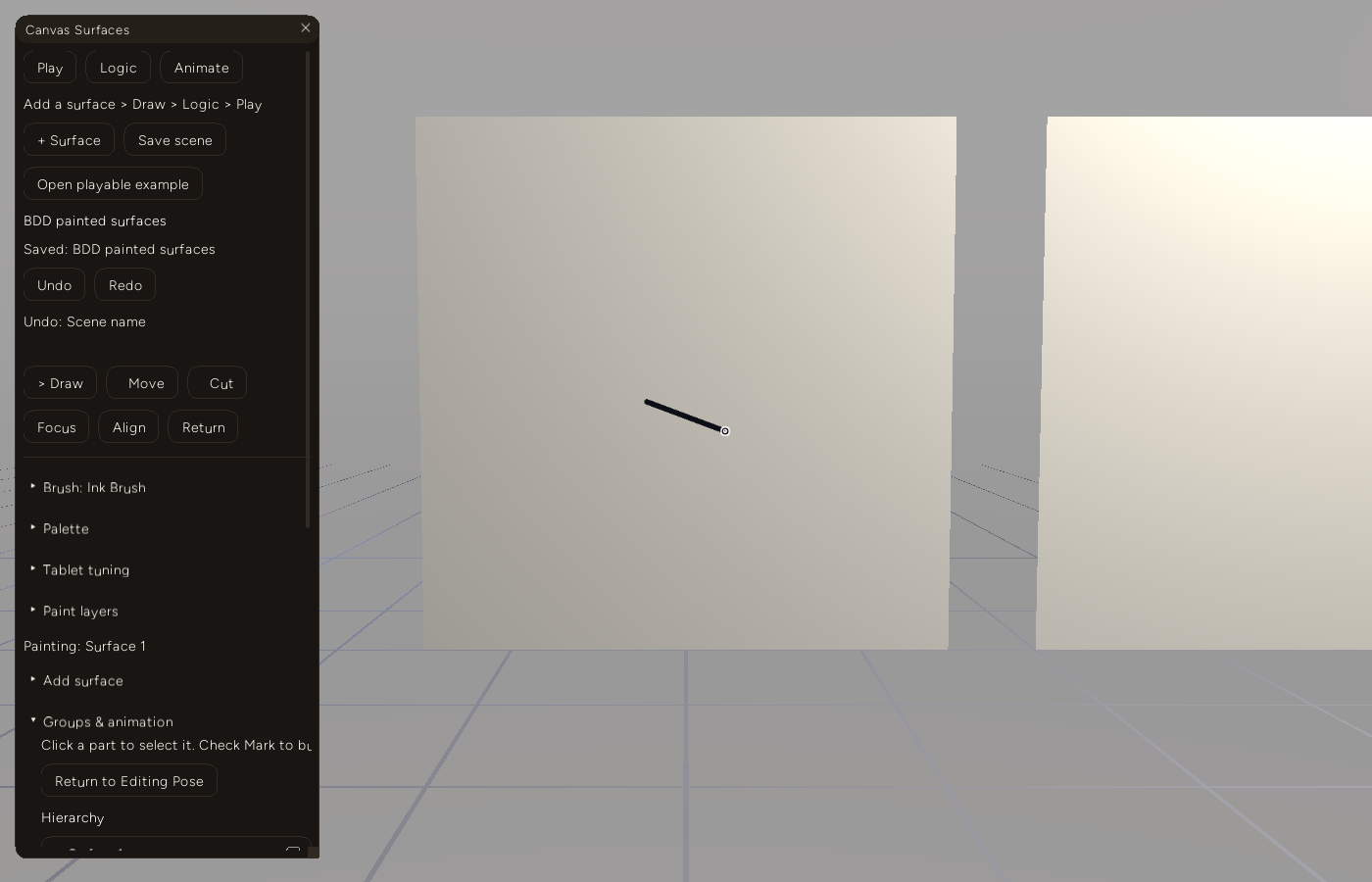
A drag injected at the viewport, painted through the same raycast a stylus uses. The persisted scene contains that one stroke.
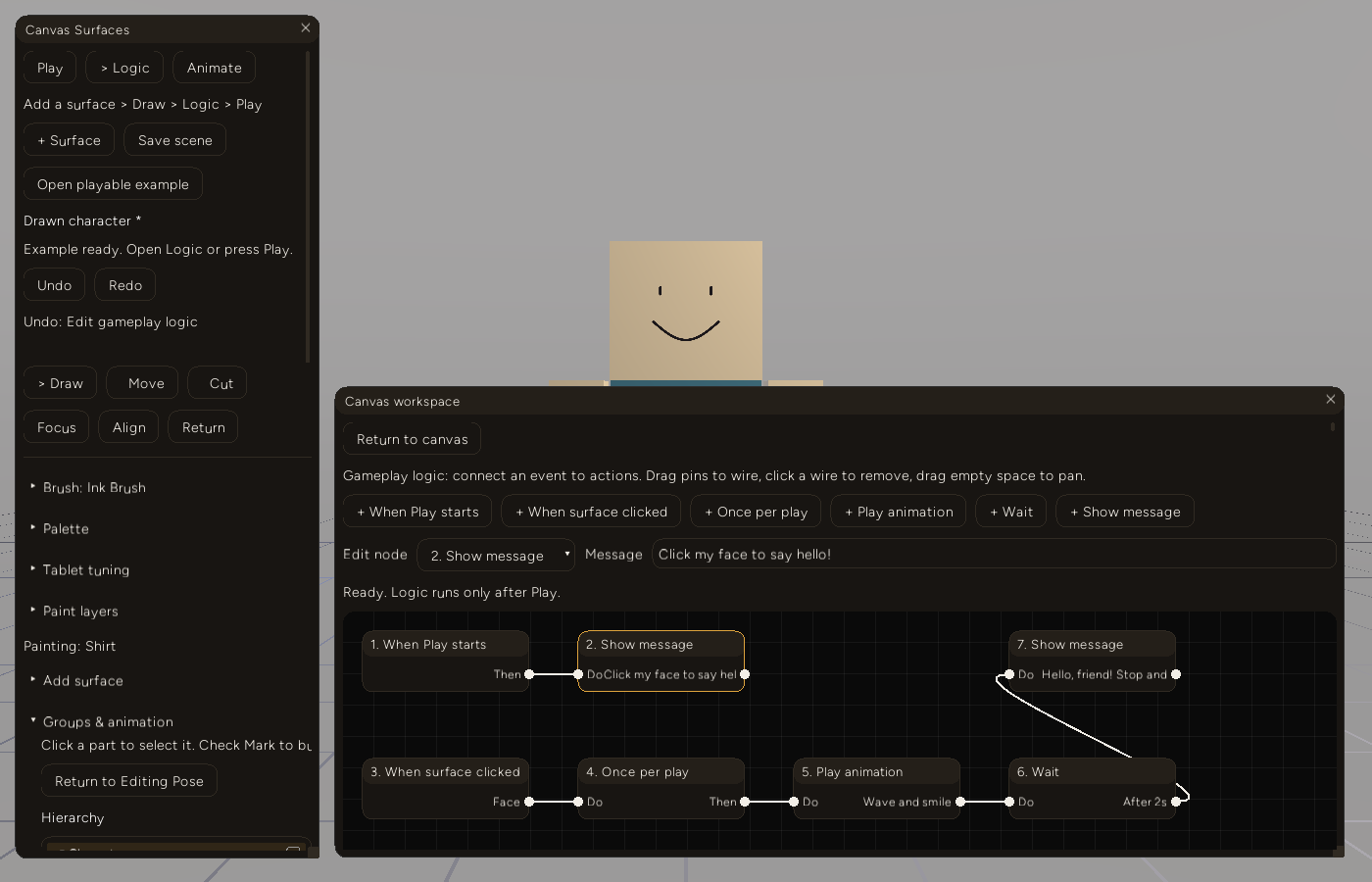
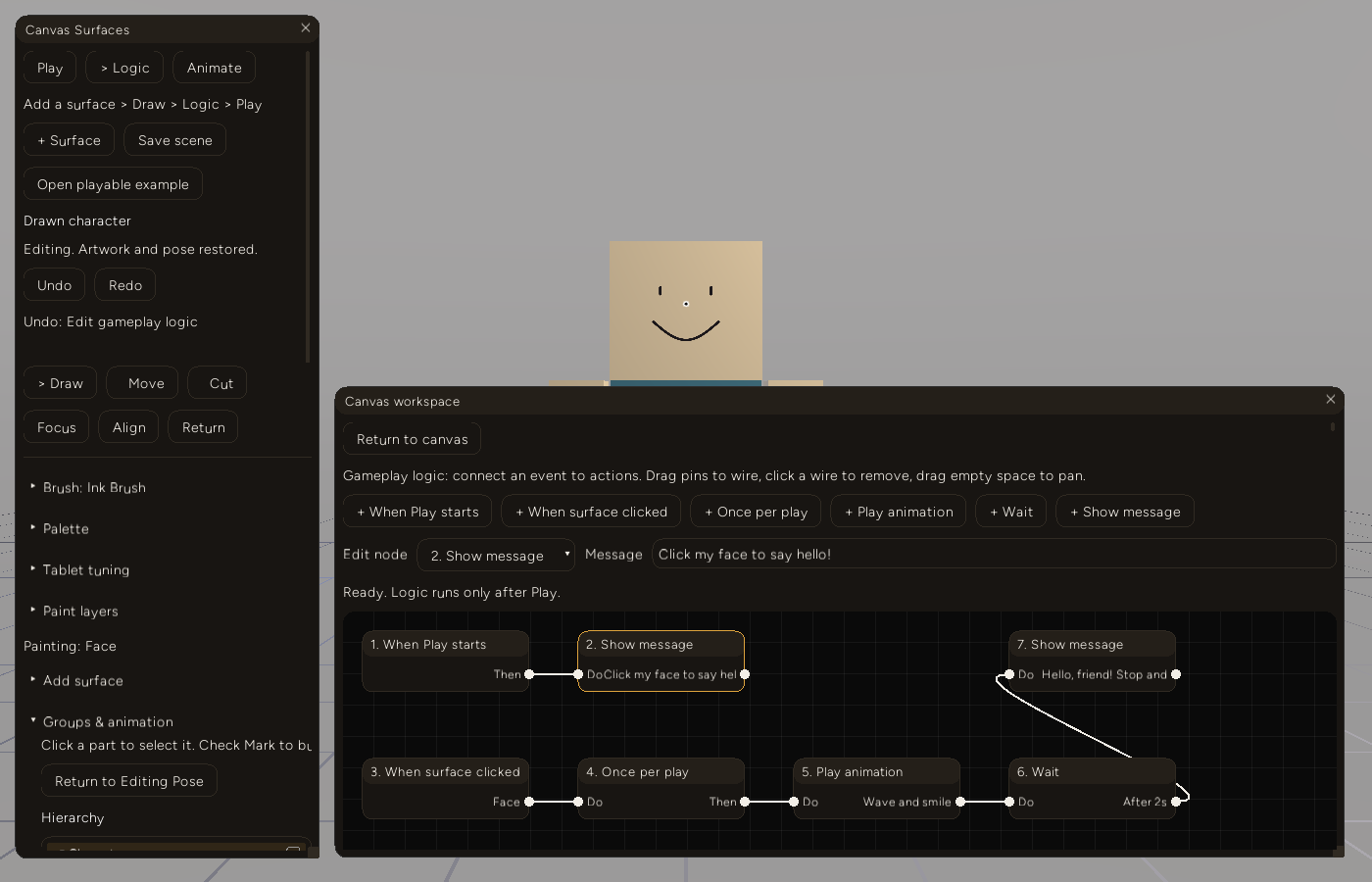
The example's graph after a node edit, a disconnect and a reconnect through the widget's own connect/disconnect events. Top row: start to a welcome message. Bottom row: click (Face) to once to clip (Wave and smile) to wait (2s) to the reply message, drawn as the wire curling back up to node 7.
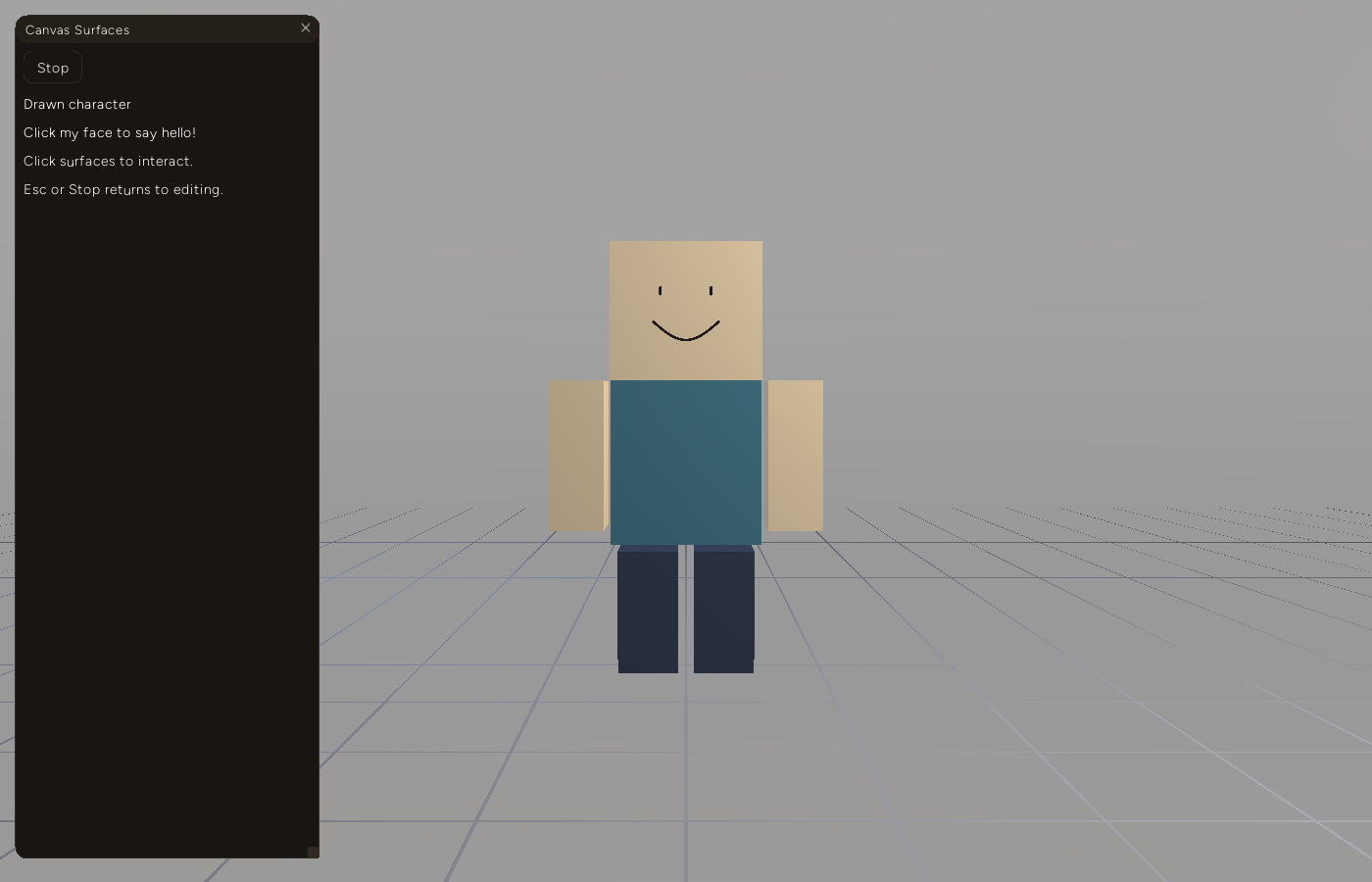
Play. The sidebar collapses to Stop and the live message. Nothing else is interactive.
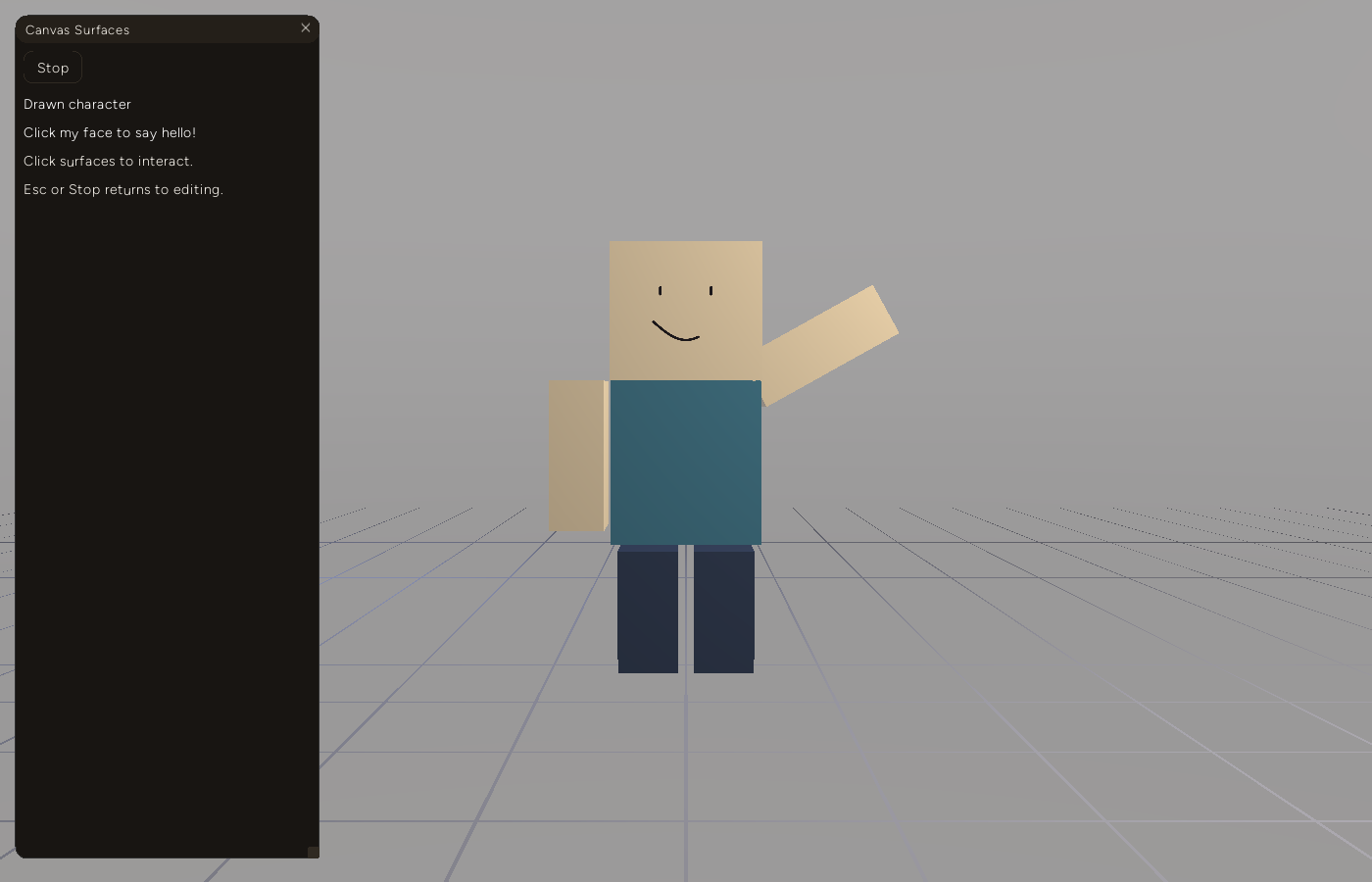
650 ms after a click on the face. The arm is mid-wave and the smile stroke is partway through drawing itself in, two tracks of one clip running together off a graph node.
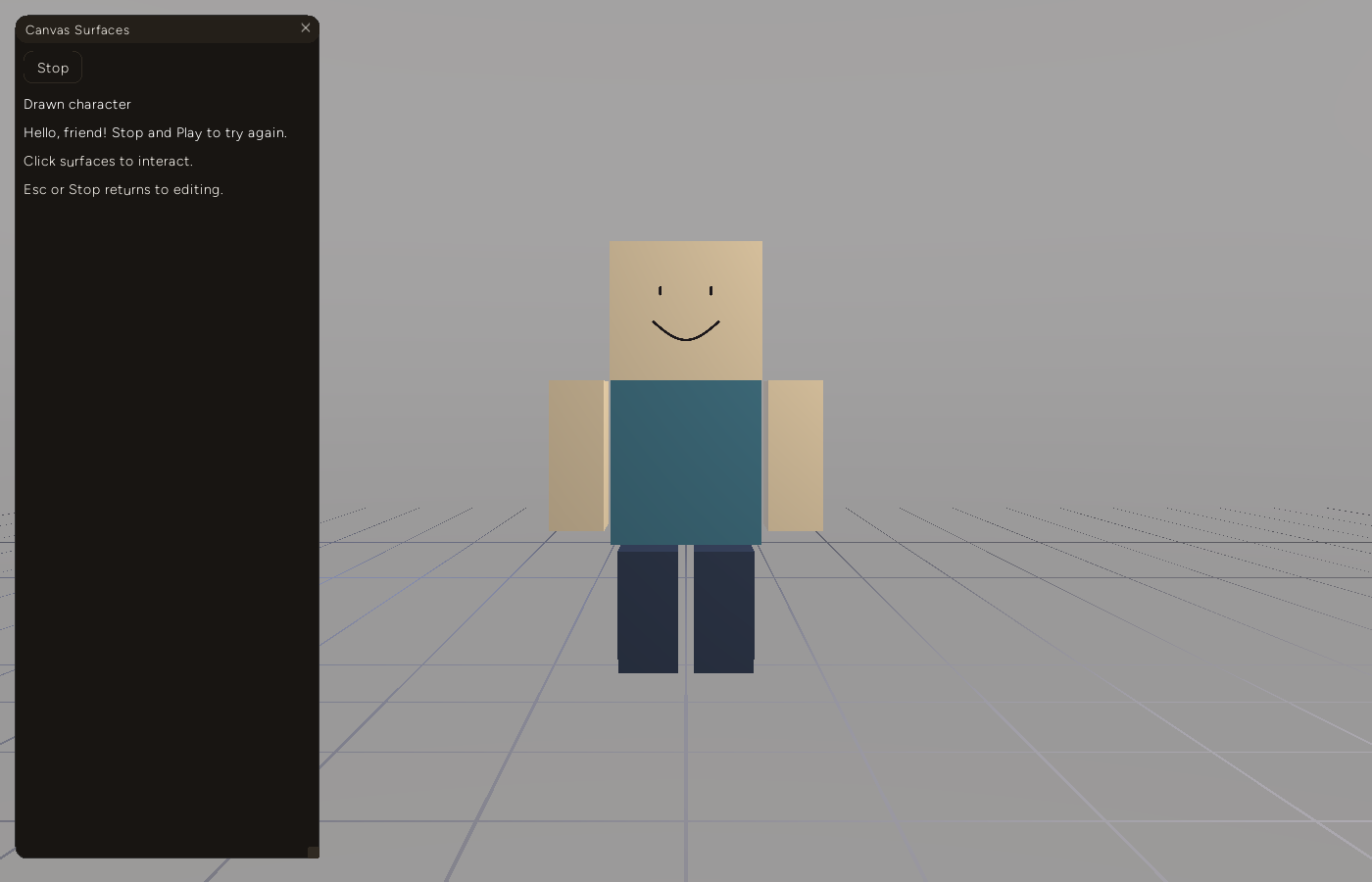
1.6 s later the wait node released, the clip finished, and the reply appeared.
After Stop: editing pose, full smile, graph unchanged, status line reads "Editing. Artwork and pose restored."
The live feature then presses Load and Play again and confirms the graph survives a real save/load round trip and still plays.
One claim is verified only in the fast tier: that Stop cancels an already-scheduled wait. The vitest scenario clicks the face, presses Stop before the wait elapses, advances the clock 100 s, and checks the reply never appears. The live run never stops during a pending wait.
Decision log
Reuse the existing node graph widget. Widget.snarl, backed by entropy_gui::NodeGraphEditor and already used by the ML Graph Trainer, handles pin dragging, wire click-to-remove, pan, and node move events. The only new code is mapping LogicGraph to its node/link shape every frame. The cost is one more thing to be careful of: it reports connect/disconnect as event strings, so the editor validates the candidate graph before committing an edit and shows the error in a label instead of the widget refusing the wire.
One session object, rebuilt each Play. A long-lived runtime that gets "reset" is where state leaks between runs. LogicSession is constructed from a deep copy of the graph on Play and dropped on Stop, so nothing the player does can dirty the document, and edits made while stopped can't leak into a running session.
No loops, on purpose. "Repeat forever" is the first thing anyone will ask for. Rejecting cycles at validation keeps every event a finite walk, which is what makes the 512-step and 256-pending budgets meaningful. The tradeoff is real: the graph is a reaction chain, not a program. Branching, conditions, and variables are all absent.
Waits count frame time, not wall time. Using tick(delta) fed from the update loop means waits pause if the app stalls and are reproducible in the fast tier by calling tick with exact deltas. The live tier uses real wait N milliseconds steps and has slack in them (650 and 1600 ms against a 2 s clip and a 2 s wait).
Failure notes
Injected viewport pointer events were being ignored, and every label assertion still passed until the last one. The first live run failed on the reply-label assertion. Two of its screenshots (playing and wave) had identical MD5 hashes, and the painted scene had zero strokes where the test expects one. So the click never landed, and neither did the earlier paint drag. Temporary logging in the mouse handler showed why: the events arrived with the right coordinates and isPointerOverUI() returned true.
The BDD driver sets ctx.pointer_over_ui = false when it injects a pointer step, on the reasoning that the real OS cursor is unrelated to injected coordinates. But addon_engine.rs re-snapshots pointer_over_ui from the GUI context at the end of every frame's render, using the real cursor. The addon saw a click "over UI" and dropped it. I did not record where the real OS cursor was, only that the per-frame snapshot overrode the driver's claim and that the fix made the click land. The fix is a persistent flag the driver sets on its first pointer step and the snapshot respects:
context.pointer_over_ui = ctx.pointer_over_ui() && !context.bdd_pointer_in_viewport;canvas_live.feature from Part 5 had no pointer steps at all, so this path had never been exercised against Canvas. Two identical screenshots taken before and after an action are a reliable "nothing happened" signal, and cheaper to spot than a mismatched label.
Entropy.Window.getSize() lies during onInit. The addon places its bottom-docked workspace window at getSize()[1] - 455. In the screenshot it sat at y=625 on a 900 px window, with the node graph entirely below the visible area. AddonContext.window_size is initialised to [1920, 1080] and only refreshed inside the first frame's update, from the camera viewport, which startup.rs builds from a hard-coded WindowSize { width: 1200, height: 768 }. Neither is the real client area. The fix seeds the context from window.inner_size() right before the bundle loads (Windows path only; other platforms still get the placeholder, which I have not tested). I left the camera and video dimension arguments alone. Changing them would touch every example's camera setup, and I did not want that in this pass.
I found this only by looking at the frame. The label assertions passed both before and after.
A window that is on screen can still hide the point of the feature. With the workspace correctly placed, the graph got about 75 px of vertical space, under two rows of add buttons, a dropdown row and a delete button. The node graph is the feature. The controls now sit in two rows (add buttons; node settings and delete), the title and hint are one line, and the window is 480 px tall instead of 430. Widget ids are unchanged, so no test needed edits.
Smaller items from the same pass: the Play-mode hint and the post-Stop status line were clipped at the sidebar's edge and were shortened to fit. The Play-mode sidebar is still a tall, mostly empty panel.
Limits
- Windows only, and on a single machine (hardware in the frontmatter). I did not pin or log which wgpu backend was chosen, so this post does not claim one.
- No real stylus was used. Pointer steps are injected as mouse events. The stylus handler has the same Play guard, and the fast tier does not exercise it.
- No performance claims. Nothing here is a benchmark.
- This work is in the working tree, not a tagged commit.
What's next
Deferred, and tracked on the project's kanban board: actions beyond "play an animation" and "show a message" (move a surface, toggle visibility, change a stroke's color); keyboard events as triggers; and a real answer for repetition, probably a bounded "repeat N times" node so the no-loops rule can stay.