The last DAW post put real plugins on the tracks. What the tracks played was still one pattern per track, looping forever, with no idea of a song. You could not say "drums only for four bars, then the bass comes in."
This pass adds the missing layer. The DAW now has sixteen channels, several patterns per track, and an arrangement of clips that loop a pattern over a span of bars. It has a bars-and-beats ruler that snaps, a transport bar with a typeable BPM box, a Song mode next to the old Pattern loop mode, and a WAV export that renders the whole song. The timeline is TrackView, the clip widget from the keyframe post, grown into an arrangement widget without changing what it does by default.
Everything is at commit 84f37c6 of the repo (18 files, +3,371 -344). It is not a tag.
What changed
- Tracks sit on channels. At least 16 lanes always exist. An empty lane is a place to start a track: click its header, or drag on it to draw a clip, and it gets a synth track.
- Patterns and clips. A track owns any number of patterns. A clip places one pattern on the timeline, starting at a step, looping for as long as the clip lasts. Clips on one lane never overlap.
TrackViewas an arrangement widget. Bars-and-beats ruler, snap grid with Alt to bypass, drag on empty lane space to draw a clip, right-click Duplicate, miniature note previews tiled per loop, per-lane colour and M/S pills, and a zoom that survives a tempo change.- A transport bar. Play/Stop, Rewind, a BPM text field with -/+ buttons, a Bar/Beat/time readout, a Song or Pattern loop switch, and Export Song to WAV.
- Old saves still open. A project from before the arrangement existed is migrated on load and written back.
- Two new AI tools,
daw_new_patternanddaw_place_clips, so a chat can arrange a whole track in two calls. - A new BDD tier for the widget that feeds real per-frame pointer input into
TrackViewthrough a headlessentropy_guicontext.
Build and run it:
cd examples/studio-bundle
npm run build-daw
cd ../..
cargo run --release --bin example -- daw
The model: steps, patterns, clips
The arrangement model lives in examples/studio-bundle/src/apps/daw_arrangement.ts. It has no Entropy.* in it, so it runs under plain vitest. The header comment settles vocabulary that gets used loosely elsewhere: a track is an instrument strip, a channel is the lane it sits on, a pattern is a looping bank of notes owned by one track, and a clip places a pattern on the timeline.
Time is in steps, one cell of the piano roll, everywhere in the model. Milliseconds only appear at the edge, where the widget wants them:
export function stepMs(bpm: number, stepsPerBeat: number): number {
    return 60000 / Math.max(1, bpm) / Math.max(1, stepsPerBeat);
}
export function stepToMs(step: number, bpm: number, stepsPerBeat: number): number {
    return Math.round(step * stepMs(bpm, stepsPerBeat));
}
Clips are stored as startStep and lengthSteps, so changing the tempo does not touch the arrangement at all. Only the conversion at the edge changes.
Clips bump, they do not overlap
Two clips on one lane would trigger every note twice, so the model never allows it. freeSpan finds the nearest neighbour on each side, and moves and trims clamp inside that span:
export function freeSpan(arr: ArrClip[], clip: ArrClip, total: number): { left: number; right: number } {
    let left = 0;
    let right = total;
    for (const other of arr) {
        if (other.id === clip.id || other.trackId !== clip.trackId) continue;
        if (clipEnd(other) <= clip.startStep) left = Math.max(left, clipEnd(other));
        else if (other.startStep >= clipEnd(clip)) right = Math.min(right, other.startStep);
    }
    return { left, right };
}

export function moveClip(arr: ArrClip[], clipId: string, newStart: number, total: number): ArrClip | null {
    const clip = arr.find(c => c.id === clipId);
    if (!clip) return null;
    const { left, right } = freeSpan(arr, clip, total);
    const hi = Math.max(left, right - clip.lengthSteps);
    clip.startStep = Math.min(hi, Math.max(left, Math.round(newStart)));
    return clip;
}
Dragging a clip into its neighbour stops it against the neighbour. It does not push it and it does not replace it. createClip follows the same rule: starting inside another clip is refused, and a clip ahead only caps the new one's length.
Playback is a modulo
Which notes start on a given step is a scan over clips. A clip that is longer than its pattern loops it:
for (const clip of p.arrangement) {
    if (step < clip.startStep || step >= clipEnd(clip)) continue;
    const track = p.tracks.find(t => t.id === clip.trackId);
    const pat = track?.patterns.find(pt => pt.id === clip.patternId);
    if (!track || !pat || pat.steps < 1) continue;
    const local = (step - clip.startStep) % pat.steps;
    for (const note of pat.notes) if (note.step === local) out.push({ track, note });
}
The offline export uses the same idea flattened: expandArrangement tiles each pattern across its clip and cuts notes where the clip ends, and buildPatternEvents hands the result to the WAV renderer. Song mode and the export share the clip model. Pattern loop mode is the old behaviour, kept as an audition mode: only the active track's active pattern, on repeat.
The starter song
A fresh project is a 16-bar song at 96 BPM with four tracks and eleven clips, using fixed ids (trk-drums, pat-drums-groove, clip-drums-3) so a script can name things. Drums alternate a Groove and a Fill pattern. The bass comes in at bar 3, the lead at bar 5, the pad at bar 7. The lead's Melody pattern is two bars long and its clips are four, so each plays it twice.
Two rules that keep a pattern audible
A pattern that no clip plays is silent, which reads as "the piano roll is broken" to anyone who has just painted notes. So the first notes written to a track with no clips at all also give it one clip spanning the song (ensureTrackHasClip), which is the old forever-loop.
Editing follows selection. Selecting a clip makes its pattern the track's active one, so the piano roll shows what that clip plays. The pattern Duplicate button copies the active pattern and, if a clip of that track is selected, points that clip at the copy. That is how you make a variation for one place in the song without touching the others.
The widget: same TrackView, options on top
TrackView was 282 non-blank lines and a plain clip lane. It is now 773, and TrackViewOptions::default() is meant to reproduce the old behaviour for callers that pass no options. The one caller I can point at, the keyframe demo, is not covered by any test here (see the failure notes). The options are a struct of thirteen optional fields (lane height, label width, snap_ms, bar_ms, beat_ms, fit_on_open, zoom_needs_ctrl, allow_draw, active_track, lane_numbers, min_clip_ms, follow_playhead, right_gutter). They cross into the addon as TracksOptionsConfig in addon_ops.rs, and op_ui_widget_tracks takes them as a trailing argument. Four new events (TRACKS_CLIP_DUPLICATE, TRACKS_CLIP_CREATE, TRACKS_TRACK_MUTE, TRACKS_TRACK_SOLO) route through the same id-keyed listener path as the existing ones.
Three parts of it were less obvious than they look.
Snapping needs the press position, not a per-frame delta. If each frame computed snap(current + delta), a small drag would round back to where it started every frame and the clip would never leave its snap point. Memory now keeps where the drag began, and every frame measures from there:
let dt = ((p.x - origin_x) * zoom).round() as i32;
// Alt bypasses the grid for a free, unsnapped placement.
let snap = if mods.alt { 0 } else { opts.snap_ms };
...
ClipDragKind::Move => {
    let s = snap_to(start0 + dt, snap).clamp(0, (end_cap - dur0).max(0));
    (s, dur0)
}
A tempo change must not resize the song on screen. Zoom is stored as milliseconds per pixel. A faster tempo shortens every bar in milliseconds, so with zoom fixed the whole song would shrink. The widget remembers the bar length it last drew with and rescales zoom by the ratio, which keeps pixels per bar constant:
if musical {
    let prev = ctx.memory(|m| m.get_scalar(bar_key));
    if let Some(prev) = prev {
        if prev > 0.0 && (prev - opts.bar_ms as f32).abs() > 0.5 {
            zoom = (zoom * opts.bar_ms as f32 / prev).clamp(MIN_ZOOM, MAX_ZOOM);
        }
    }
    ctx.memory_mut(|m| m.set_scalar(bar_key, opts.bar_ms as f32));
}
Overlapping hit areas are decided by registration order. The widget has no occlusion, so the ruler, headers and clips are registered before the empty-lane draw gesture and the background pan. A press on a clip is claimed by the clip before the lane sees it. This has one visible consequence for other callers, covered in the failure notes: BackgroundClicked no longer fires when the press landed on a clip, a header or the ruler. An empty stretch of lane still counts as background, so it fires both TrackClicked and BackgroundClicked.
Delete is scoped too. It removes the selected clip only while the pointer is over the canvas, because the same window holds a BPM field and Backspace in that field must not eat a clip.
The BPM box keeps what you type
A text field that mirrors project.bpm cannot be typed into: entering 140 passes through 1, which is out of range. The addon keeps a draft string, applies the value only when it parses inside 20 to 300, and shows a label while it does not:
function commitBpmText(text: string) {
    bpmDraft = text;
    const value = parseFloat(text);
    if (Number.isFinite(value) && value >= BPM_MIN && value <= BPM_MAX) {
        setBpm(value);
        bpmDraftFor = project.bpm;
        persist();
    }
}
setBpm also re-anchors a running transport (startedAt = now - pos * stepDuration()), because the playhead is elapsed time divided by step duration and would otherwise jump when the divisor changed.
The field needed two changes underneath it. Widget.textInput gained a width, and the Rust side gained Ui::text_edit_singleline_sized(text, width, id). Its focus is keyed by the caller's id. The old auto id is derived from how many widgets were drawn before it, so a field in a row that gains or loses a widget could lose focus.
Testing: three tiers
Model and addon, fast. tests/daw_arrangement_bdd.test.ts parses tests/features/daw_arrangement.feature (19 scenarios) and runs each step against the production addon with a stand-in Entropy. It captures the widget configs each render and calls the exact callbacks the real widgets would. Eight more tests exercise the model directly. An unknown step or line throws instead of being skipped, so the feature cannot drift from what runs. A sample:
Scenario: BPM is a typeable field that keeps what is typed until it is valid
  Given the DAW is open
  Then the BPM is 96
  When I set "bpm_input" to "1"
  Then the BPM is 96
  And the BPM box shows "1"
  And I see the label "BPM must be between 20 and 300."
  When I set "bpm_input" to "140"
  Then the BPM is 140
  And the arrangement ruler is in bars of 1714 ms with a beat of 429 ms
The widget, headless. tests/track_view_bdd.rs (harness = false, cucumber) drives the real TrackView frame by frame through a headless entropy_gui context with the same pointer state the window backend produces. It exists because a fake Entropy in vitest cannot tell you whether a drag on a 10 ms-per-pixel timeline snaps. Sixteen scenarios, for example:
Scenario: Dragging a clip snaps its start to the beat
  When I drag clip "a" by 880 ms
  Then clip "a" was moved to start at 2000 ms
  And no clip was created

Scenario: Holding Alt while dragging skips the grid
  When I hold Alt
  And I drag clip "a" by 880 ms
  Then clip "a" was moved to start at 1880 ms
The real window. tests/features/daw_arrangement_live.feature is replayed by the same in-engine driver the browser and canvas suites use, against the real compiled example daw. The driver gained a step, I send the widget event "...", which passes an event string to the addon exactly as a widget would push it (TRACKS_CLIP_CREATE|arrangement|empty:8|3750|3750), and ENTROPY_DAW_BDD_FEATURE=arrangement selects this script. I see the label also had to be fixed for tabbed addons: ui_frame_labels was only being filled for windows, so the first label assertion in a tab-based addon had nothing to read.
Run fresh for this post:
$ npx vitest run tests/daw_arrangement_bdd.test.ts --pool=threads
 Tests  27 passed (27)

$ cargo test --release --test track_view_bdd
16 scenarios (16 passed)
116 steps (116 passed)

$ cargo test --release --test daw_arrangement_live -- --nocapture
  arrangement-01-starter.png: 1400x900, 1885 colours
  ...
  arrangement-07-stopped.png: 1400x900, 2134 colours
test daw_arrangement_live_feature ... ok
test result: ok. 1 passed; 0 failed; finished in 5.49s
The other two live suites that share the driver still pass: browser_bdd (3 fast scenarios, 13 steps, live tier exit code 0) and canvas_bdd (2 of 2, --test-threads=1).
The live test asserts more than "the steps ran." It requires each PNG to be a real PNG of at least 1000x600 with more than 400 distinct colours, and every capture to differ byte-for-byte from the last. It also reads the project the addon persisted to disk: BPM 128, five tracks each on its own channel, the drawn track on channel index 8 with a clip at step 32 for 32 steps, the bass track holding three patterns (Root, Walk, Root copy), the copy holding six notes and the original still holding four, the pad muted, the lead's solo back off.
Does the test notice a real bug?
I removed the neighbour clamp from moveClip (leaving a plain Math.max(0, Math.round(newStart))) and ran the fast tier. Two tests failed and 25 passed:
 × A moved clip bumps into its neighbour instead of overlapping it
 × never lets two clips on a lane overlap however they are dragged
 Tests  2 failed | 25 passed (27)
Those are exactly the two tests about that rule. I reverted it and the file is back to its original size with 27 of 27 passing.
Evidence
Every image below is a composited PNG written by the live test at 1400x900, not a mock-up.
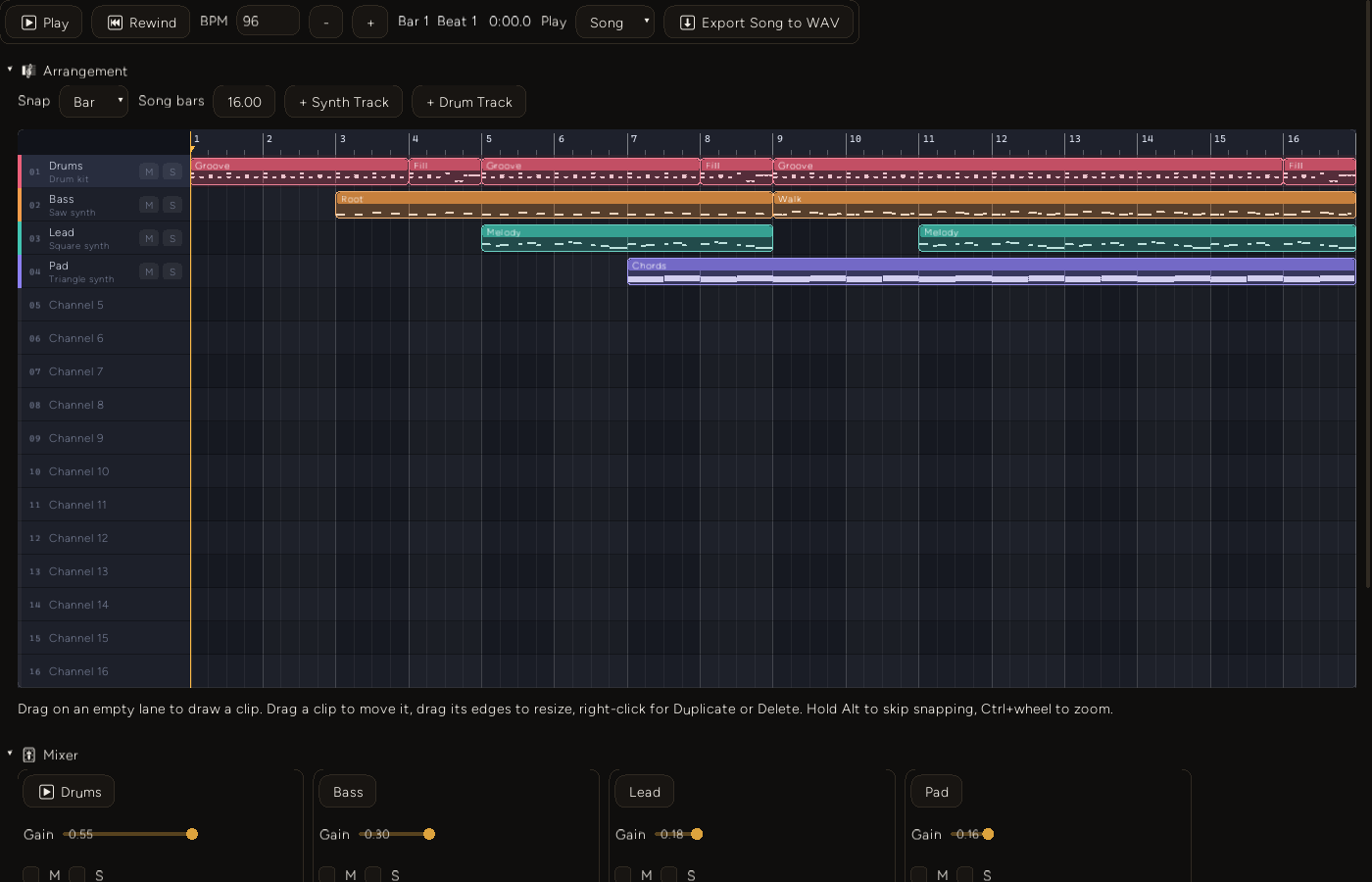
The starter song. Sixteen lanes, four with tracks. Drums alternate Groove and Fill clips, the bass enters at bar 3, the lead at bar 5, the pad at bar 7. Alternate bars are shaded, and each clip carries a miniature of its pattern's notes.
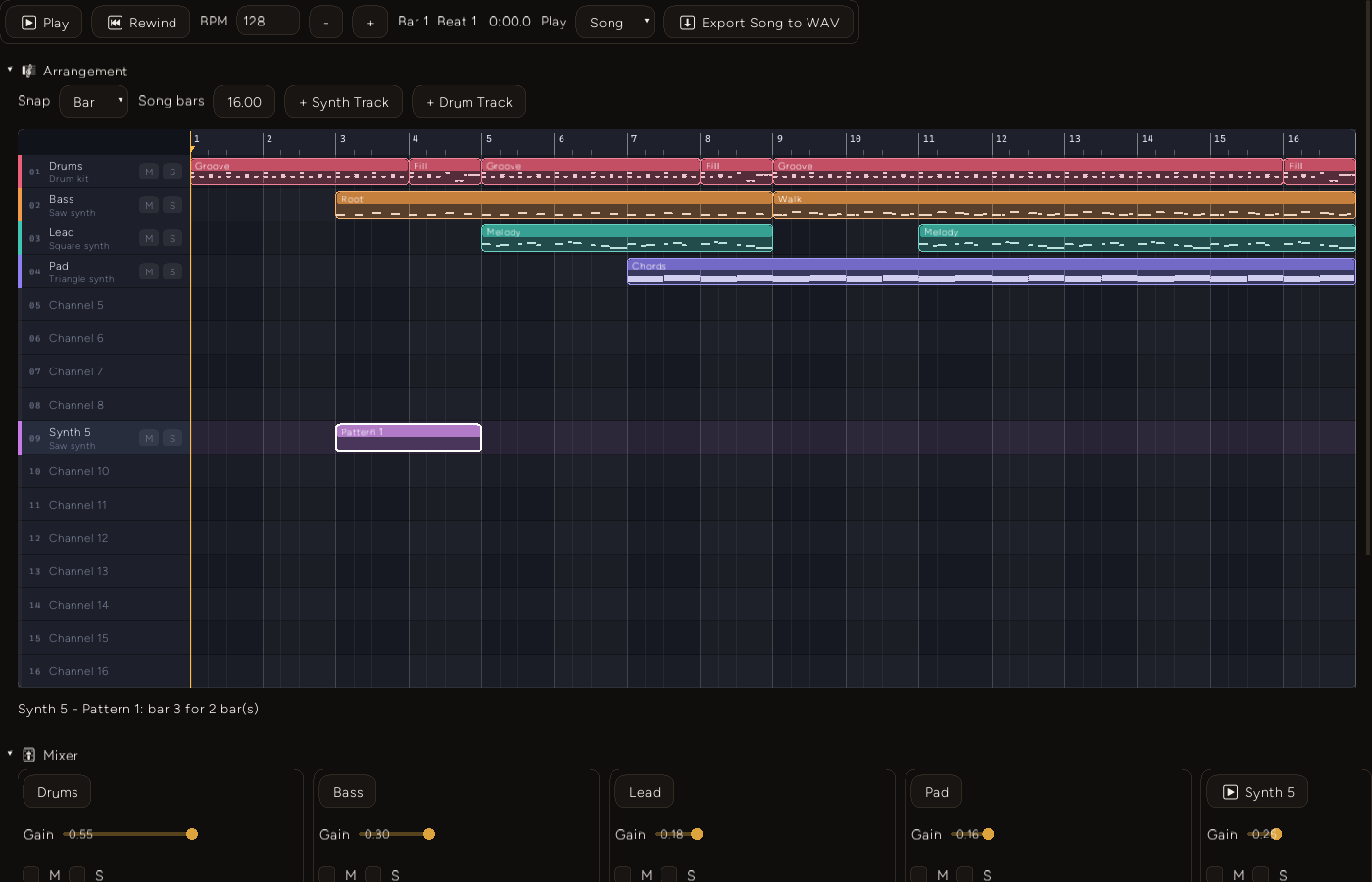
After typing 128 into the BPM box and drawing on the empty Channel 9 lane. The drawn clip created a track named Synth 5 on that channel. The song fills the same width as at 96 BPM, which is the zoom rescale doing its job.
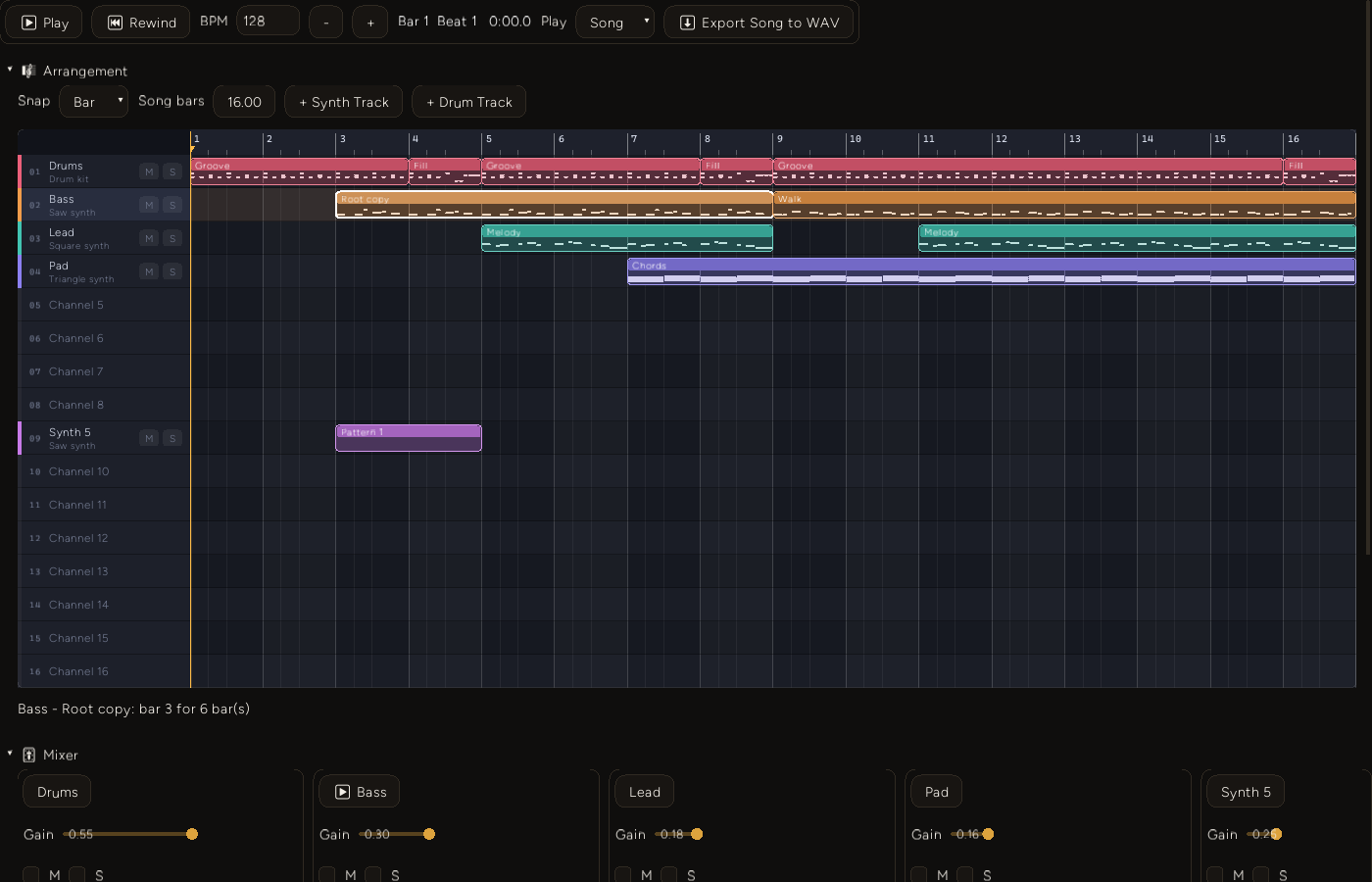
A duplicated pattern with two notes painted into it, playing only where the selected clip is. The Walk clip at bar 9 is untouched.
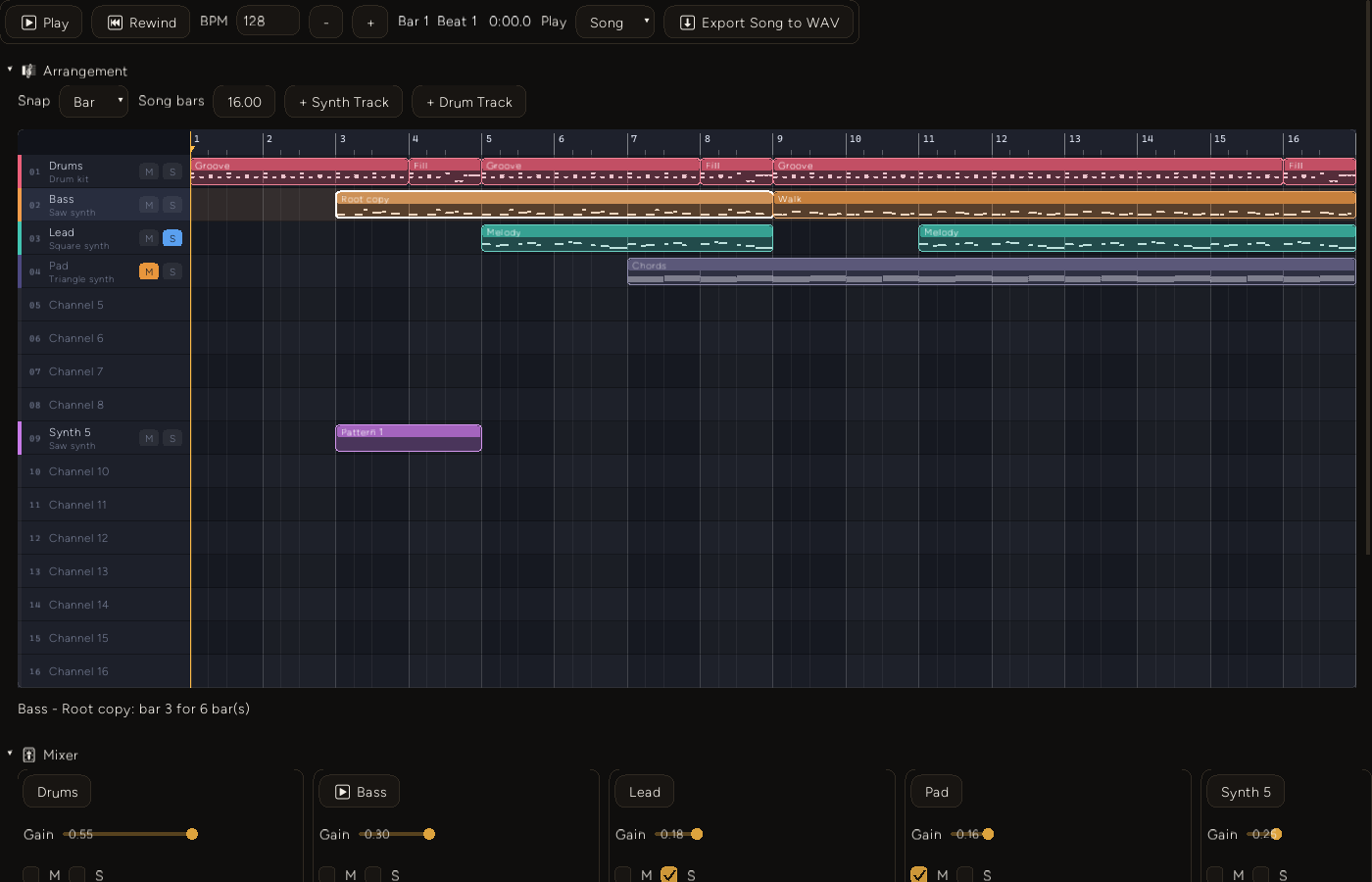
Mute on the pad, solo on the lead, both routed to the audio buses. The muted lane's clips step back. Note what does not happen: the lanes silenced by the solo look exactly as they did before.
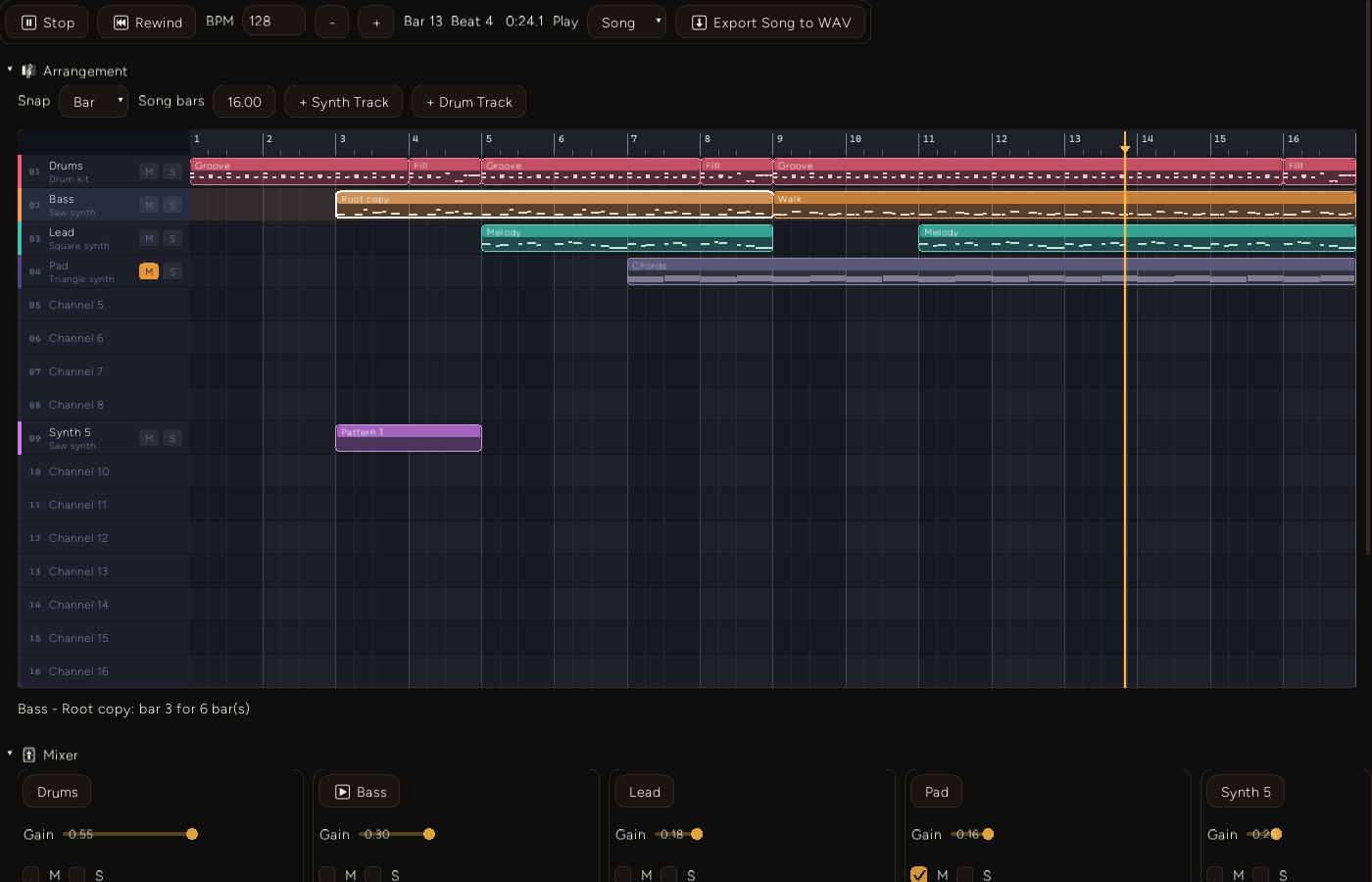
Playing from a ruler seek at 22.5 s. 1.5 s later the readout is Bar 13 Beat 4 0:24.1. At 128 BPM a bar is 1.875 s, so 24.0 s is 12.8 bars in, which is bar 13, beat 4. Stopping keeps the position: the last capture, taken 600 ms after Stop, still reads Bar 13 Beat 4 0:24.1 with the Play button back.
One number
The addon rebuilds the whole arrangement description every frame. I measured it with a throwaway vitest probe that imports the production addon against a stub Entropy, using the same stubbing approach as the BDD harness, and times the tab's render callback over 5,000 calls after 500 warm-up calls (Node v24.11.1, the i5-12500). For the starter song (16 lanes, 11 clips, 116 miniature notes), three runs:
jsonBytes=5831 renderUsPerFrame=7.3 / 7.5 / 7.3 stringifyUsPerFrame=56.2 / 57.9 / 57.3That is 5,831 bytes of description and about 7 microseconds of JavaScript to build the whole UI's description, per frame. It is not the cost of drawing, it runs in Node and not in deno_core, and it does not include the trip across the op boundary. The op takes #[serde] arguments, so I expect no JSON text step, and the JSON.stringify figure is only a rough proxy for how much data crosses. The probe is not in the repo, so treat these as a sanity check that per-frame rebuilding is not a problem at this size, not as a benchmark you can rerun. I have not measured a 16-track, 100-clip song.
Decision log
Steps in the model, milliseconds at the edge. The widget works in milliseconds, but a clip stored in milliseconds would have to be rewritten on every tempo change. Steps make the tempo a pure display concern. The cost is rounding at the boundary. At 140 BPM a bar is 1714.29 ms, but the widget is told 1714, so by arithmetic its bar lines land about 4 ms early by bar 15. msToStep rounds back to the nearest step, so no clip ends up off the grid. I have not measured the drift on screen.
Bump, do not push or replace. Overlaps are refused at the model level because they double-trigger notes. Pushing neighbours along (ripple) or replacing them silently would each be a surprise with no undo behind it. The tradeoff is a slightly stiffer feel: to put a clip where another one sits, you resize or delete the other first.
A lane is an instrument, so clips only move in time. Dragging a clip to another lane is not offered. A drum clip on a synth lane would read its rows as pitches and sound completely different. This is a deliberate limit, tracked on the board as daw-arrangement-clip-editing.
Right-click Duplicate is linked, and the pattern button makes the unique copy. Duplicating a clip places a copy after the original pointing at the same pattern ({ ...src, id, startStep }). Edit one and you edit both. That is the usual arrangement-view behaviour and it is cheap. The pattern Duplicate button is the way to get an independent variation. The cost is that the difference is invisible until you edit.
Extend TrackView behind an options struct rather than forking it. One widget, with Default meaning the old behaviour, beats a second near-copy that both need bug fixes. The cost is the size of the file (282 to 773 non-blank lines), and one real behaviour change for every caller, in the failure notes below.
Failure notes
cargo test without --release does not build in this checkout. I tried cargo test --test track_view_bdd in the debug profile to check a note that it crashes rustc. What I actually got:
error[E0786]: found invalid metadata files for crate `futures_lite` which `entropy_engine` depends on
error[E0463]: can't find crate for `entropy_engine`
error: could not compile `entropy-engine` (bin "example") due to 1 previous error
An earlier attempt had shown E0460 on regex_automata instead. That points at corrupted artifacts in target/debug, not at the source. The project's own notes attribute the original failure to a rustc STATUS_STACK_BUFFER_OVERRUN in a debug build, which I did not reproduce. I did not clean the directory. Everything in this post ran with --release.
BackgroundClicked no longer fires for a press on a clip, header or ruler. That is the right behaviour for an arrangement view, but it is a change for everyone. Two scenarios pin the clip and empty-lane cases: a press on a clip selects it and is not a background click, and a plain click on an empty lane fires both TrackClicked and BackgroundClicked. The header and ruler cases come from reading the code (press_taken), and no scenario covers them. The other in-repo caller, keyframe_tracks_demo_addon.ts, clears its selection in onBackgroundClicked. I did not run that demo and no test covers it.
Ruler labels are snapped to whole pixels. The code at widgets_tracks.rs:399 carries a comment that a label at a fractional x rasterized its glyphs at a sub-pixel offset and two-digit bar numbers came out doubled. In the frames above the two-digit labels (10 to 16) render cleanly. I did not reproduce the doubling without the rounding.
A stale reference in the model's own header. The comment at the top of daw_arrangement.ts says it is exercised by tests/daw_arrangement.test.ts. The file is tests/daw_arrangement_bdd.test.ts.
The full tsc --project tsconfig.json --noEmit run exits non-zero, from type errors in unrelated addons that were there before this work. Filtered to daw_arrangement and daw_synth_addon, it reports nothing.
Two things the screenshots showed that I did not expect to write down:
- Solo does not dim the other lanes. In the mute/solo frame the soloed lead lights its S pill, and the muted pad greys its clips, but drums and bass look untouched even though the bus silences them.
TrackViewonly knowsmuted. Tracked asdaw-arrangement-solo-dim. - The mixer runs off the right edge. The Mixer section lays strips out in one row. In the 1400 px frames the fifth strip is already cut off, and the arrangement now makes sixteen tracks easy. Tracked as
daw-mixer-strips-overflow.
Limits
- Windows only, on the single machine in the frontmatter. I did not pin or log which wgpu backend was chosen, so this post does not claim one.
- The piano roll is not in any screenshot. It sits below the 900 px fold, so painted notes are verified through the persisted
DAW.json, not by eye. Tracked asdaw-arrangement-live-coverage. - There is no undo for arrangement edits and no multi-select.
- No performance claim beyond the one small number above.
- The work is commit
84f37c6, not a tagged release.
What's next
Tracked on the project's kanban board: clip copy and paste, multi-select, and undo for arrangement edits; a loop or cue region on the ruler; per-clip colour and rename; vertical scroll inside TrackView; a wrapping mixer; and a live capture of the piano roll with an export path that can read its WAV back. On the audio side, the existing backlog item still stands: notes are triggered from the JS frame, not on sample boundaries, and a song makes that jitter easier to hear than a single loop did.