The analyzer post taught the DAW to show what a note looks like. This one runs the other way: the picture is the instrument.
A wavetable is a stack of single-cycle waves. A note plays one wave at its pitch and slides through the stack as it sounds, so where you are in the stack decides the timbre. Seen from the side, the stack is a height field: phase across, frame into the screen, level up. In Entropy's DAW a synth track can now play one, and the stack is drawn as terrain that you sculpt directly, with a mouse or a pen, while a note sounds.
Everything here is in an uncommitted working tree, so there is no commit or tag to point at. What I did not verify: a physical pen (pressure, tilt, eraser end and side button reach the widget through code I read, never through real hardware), a physical mouse (the tests inject pointer state), and audible playback by a person. Every number below was measured on the machine in the frontmatter.
What changed
audio::wavetable. A 32-frame by 2048-sample table with a brush, undo, eight presets and a save format. The audio thread reads it through a flat array of atomics, so a note that is already sounding hears an edit on its next sample. Every frame is stored band-limited at 20 half-octave levels.WavetableVoice. Arodio::Sourcewith a cubic read, a morph between frames, a resting position plus an LFO, a decaying sweep and a velocity amount, up to seven unison voices, a filter and an envelope.entropy_gui::WavetableView. The terrain, drawn as ridges that hide each other, a brush that lies on the surface, a single-cycle pen strip, the selected frame's harmonics and a keyboard.- Pen state in the GUI kit.
PointerStategainedpen: Option<PenState>with pressure, tilt, side button and eraser end. Entropy.Wavetable,Widget.wavetable, and four note calls onEntropy.Audio. Plus a fourth argument torenderPatternToWavso a bounce plays the sculpted table.- The DAW. A synth track whose waveform is "wavetable", a floating Wavetable window, the transport toggle, and an AI tool,
daw_wavetable, that sculpts the same table and can "hear" a note without a speaker. - Six test tiers, one of which plays the real DAW through the real audio device and renderer.
A table the audio thread can read while you edit it
The constraint is the one from the analyzer: the audio thread may not lock or allocate. The table is edited constantly, on another thread, by a pen. So the audio side reads a flat array of AtomicU32 holding f32 bit patterns, indexed by level, then frame, then sample. 20 levels by 32 frames by 2048 samples is 5.0 MiB.
#[inline]
fn read_frame(&self, level: usize, frame: usize, phase: f32) -> f32 {
    let base = self.base(level, frame);
    let x = phase * TABLE_SIZE as f32;
    let xi = x.floor();
    let t = x - xi;
    let i = (xi as i64 as usize) & MASK;
    let g = |k: usize| f32::from_bits(self.mips[base + (k & MASK)].load(Ordering::Relaxed));
    let (y0, y1, y2, y3) = (g(i.wrapping_sub(1)), g(i), g(i + 1), g(i + 2));
    let c1 = 0.5 * (y2 - y0);
    let c2 = y0 - 2.5 * y1 + 2.0 * y2 - 0.5 * y3;
    let c3 = 0.5 * (y3 - y0) + 1.5 * (y1 - y2);
    ((c3 * t + c2) * t + c1) * t + y1
}
The editing side keeps the plain Vec<f32> of time-domain frames, applies brush dabs to it, and republishes only the frames a dab touched: an FFT of the frame, then one inverse FFT per level. Nothing waits on anything. The cost of that is one caveat I have not resolved: a read that lands in the middle of a frame's rebuild can splice old and new samples of that frame. Each float is atomic, so nothing is torn or undefined, but a splice is a step in the waveform and may be audible as a click. I did not measure how often it happens. tests/wavetable_no_alloc.rs checks only that the output stays finite and bounded while another thread edits.
The band limits are the point
The classic wavetable failure is aliasing: a bright table played high has harmonics above Nyquist that fold back as inharmonic noise. So each frame is stored 20 times, at half-octave bandwidths, and a note reads the most detailed copy whose harmonics all fit:
pub fn level_harmonics(level: usize) -> usize {
    let max = (TABLE_SIZE / 2 - 1) as f32;
    ((max / 2f32.powf(level as f32 * 0.5)).floor() as usize).max(1)
}

pub fn level_for(freq: f32, sample_rate: f32) -> usize {
    let fits = ((sample_rate * 0.5) / freq.max(1.0)).floor() as usize;
    (0..MIP_LEVELS).find(|&l| level_harmonics(l) <= fits.max(1)).unwrap_or(MIP_LEVELS - 1)
}
Level 0 keeps 1,023 harmonics and level 19 keeps one. Each copy has DC removed, so lifting a whole frame with the brush moves the picture but does not thump the speaker, and the top fifth of the kept harmonics is tapered with a raised cosine so the cut does not ring. Publishing the 9 frames a typical dab touches costs 0.51 ms, the whole table 1.81 ms.
The voice
A note's place in the table is one small function:
pub fn position_at(p: &WavetableParams, t: f32, lfo_phase: f32) -> f32 {
    let vel = (p.velocity.clamp(0.0, 1.0) - 0.5) * p.vel_to_position;
    let sweep = p.sweep * (-t / p.sweep_time.max(0.005)).exp();
    (p.position + vel + sweep + p.lfo_depth * 0.5 * (TAU * lfo_phase).sin()).clamp(0.0, 1.0)
}
A held note also reads its resting position from an atomic, so the Position slider moves a note that is already sounding. That is the interaction a wavetable synth lives on, and it needed no rebuild of anything.
The brush
A dab (Stamp) is measured in world units, not in table cells: the terrain is 2.0 wide (one cycle) and 1.6 deep however many frames there are, so a round brush is round on screen at 32 frames or 64. The footprint is a cosine bell, zero at the edge so a dab never leaves a step, and it wraps around the cycle edge, because a cycle is periodic and an edit at phase 0 has to reach phase 1.
pub fn falloff(d: f32) -> f32 {
    if d >= 1.0 { 0.0 } else { 0.5 * (1.0 + (PI * d).cos()) }
}
How hard a stroke works is integrated over time, so it is the same at 30 and 144 frames per second. The moment's amount is shared between the dabs that carry the brush from the last pointer position to this one, spaced 0.3 radius apart:
pub fn brush_amount(strength: f32, pressure: f32, dt: f32) -> f32 {
    strength.clamp(0.0, 1.0) * BRUSH_RATE * pressure.clamp(0.0, 1.0) * dt.clamp(0.0, 0.1)
}
Raise and Lower add and subtract under the bell. Smooth blends toward a local average (a box blur along phase sized to the dab, built from prefix sums, and a 1-2-1 blur across frames). Level pulls toward the height where the stroke began. Every stroke is one undo step, 40 deep, from a snapshot.
Picking a point on a terrain
The terrain is a height field, so the point under the pointer is a ray-march: intersect the ray with the slab that holds the terrain, step through it in 256 steps until the ray is below the surface, then bisect twelve times.
const TOLERANCE: f32 = 0.008;
// ...
let above = |t: f32| {
    let p = add(o, scale(d, t));
    let frame = frame_at_z(table.frames(), p[2]);
    p[1] - table.value_at(frame, p[0] * 0.5 + 0.5) * hs - TOLERANCE
};
Two details in there each cost a bug (see the failure notes). The surface is picked 0.008 world units thick, and a stroke aims at a frozen copy of the surface (Surface::of(table)) taken when the stroke began, not at the surface it is editing.
Drawing a solid out of lines
There is no depth buffer here. entropy_gui is a 2D painter, so the terrain is drawn back to front, and each ridge draws an opaque curtain under itself so it hides what is behind it. The curtain's colour is the backdrop's own vertical gradient at that screen row, so it is invisible except where it covers a line:
// 1. The opaque curtain that hides what is behind this ridge, in the backdrop's own colours.
band(&painter, &top, &base, |i| rgba(bg(top[i].y), 1.0), |i| rgba(bg(base[i].y), 1.0));
// 2. A tinted wash just under the crest, stronger where the wave is high.
// 3. Glow, then the line itself, brightening toward crests.
On top of that: a teal-to-violet-to-pink ramp by frame, a wash that is stronger where the wave is high, a white-hot selected frame, and an amber ridge at the frame a sounding note is reading, fed by two atomics the voice writes every 256 frames.
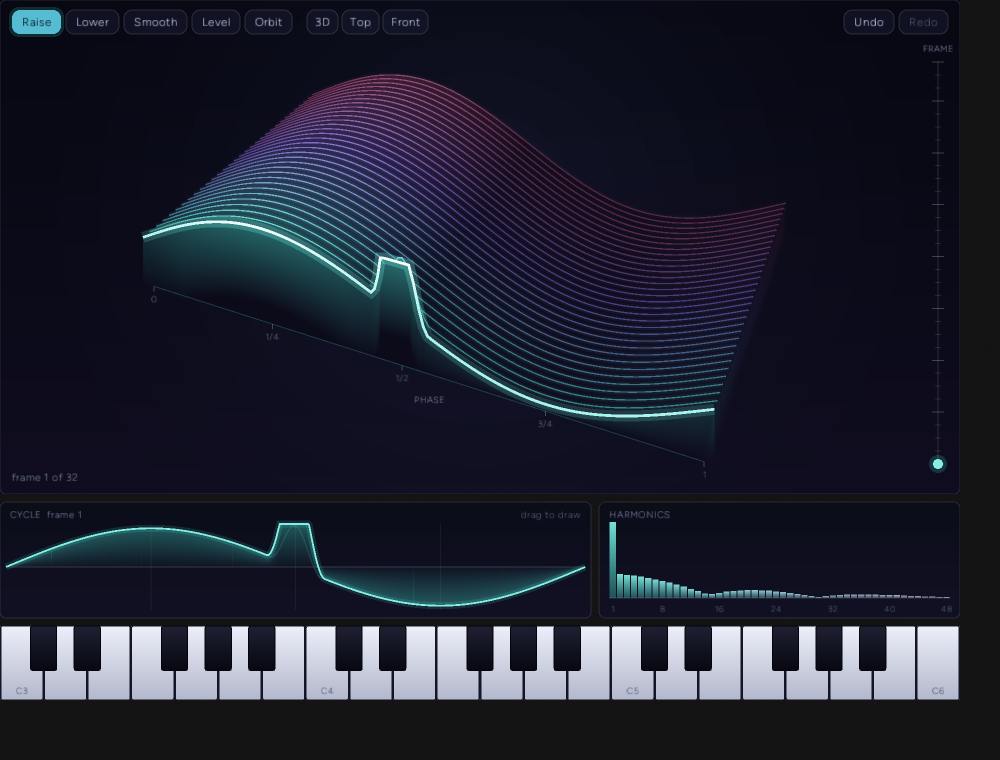
The camera is fitted to the widget: project the slab's corners, then scale and shift the picture to fill the rectangle. A wide widget would still be letterboxed by the height, so the phase axis is stretched on screen by up to 2.6 times. World space, the brush and the picking stay unstretched; the ray is transformed back before it is used.
Mouse and pen
A mouse and a pen do the same things with the same gestures. The differences are what the pen adds. Pressure scales both strength and radius. Tilt leans the brush footprint. The eraser end lowers where the tip would raise. The side button orbits the camera, so a stylus never needs a keyboard to move it. A mouse presses at a fixed pressure of 0.8, and Shift inverts Raise and Lower for it.
Getting the pen to the widget took a small chain. winit's Touch::force carries pressure, and its documentation says it is only available on iOS 9.0+, Windows 8+, Web and Android. Its Normalized variant says it has no way of knowing how much pressure 1.0 corresponds to. Tilt, the side button and the eraser are not in winit at all; they come from the POINTER_PEN_INFO packet that stylus.rs already reads with a message hook, keyed by pointer id. The winit-to-GUI translation joins the two:
let pressure = match touch.force {
    Some(winit::event::Force::Normalized(f)) => f as f32,
    Some(winit::event::Force::Calibrated { force, max_possible_force, .. }) if max_possible_force > 0.0 => (force / max_possible_force) as f32,
    _ => 1.0,
};
// ... tilt, barrel and eraser from stylus.rs's map for this pointer id ...
// The pen's side button is this pen's right mouse button.
self.secondary_down = pen.barrel;
self.pen = Some(pen);
The footprint is stretched along the lean by up to 3.2 times while keeping its area (semi-axes r * sqrt(a) and r / sqrt(a)), and the lean is turned into a direction on the terrain through the camera, so a pen that leans right along the screen makes a footprint that lies along the phase axis however the terrain is turned:
let aspect = 1.0 + (mag / 60.0).clamp(0.0, 1.0) * 2.2;
let (right, toward) = proj.ground_axes();
let (nx, ny) = (tilt_x / mag, tilt_y / mag);
let dir = [right[0] * nx + toward[0] * ny, right[1] * nx + toward[1] * ny];
// Frames run toward -z, so a world dz of `d` is a table dz of `-d`.
(aspect, (-dir[1]).atan2(dir[0]))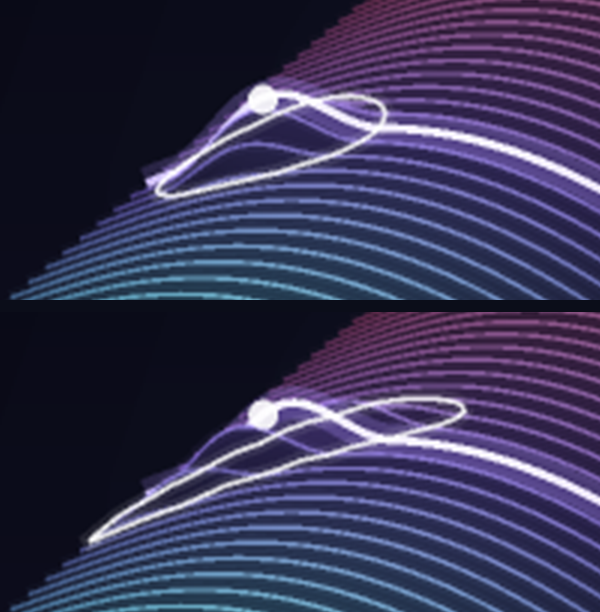
Pen input is the least verified part of this work. A tilt below 4 degrees is treated as upright, and a tablet that reports no tilt sculpts round. Nothing here has met a physical pen.
The DAW side
A synth track whose waveform is "wavetable" saves its table as base64 next to its settings (DAW.json gets the 16-bit table behind a WVT1 header, 174,776 characters for 32 frames). The floating Wavetable window has presets, whole-table operations, brush size and strength, "Hear while sculpting" (a note plays for the length of each stroke), "Hold a note" (a latched note, which the Position slider then moves through the table), the terrain, and a right column of Motion and Voice sliders. The sequencer, the preview keys and the WAV export all play the table. The Drum Rack window now starts hidden, like Guitar Input.
The AI tool daw_wavetable has six actions: info, preset, op, sculpt, params and hear. sculpt calls the same brush a pen uses. hear renders one note offline through the same voice and reads back its loudness, strongest frequency and brightness, so an agent can check that an edit did what it intended without a speaker.
Testing: six tiers
| Tier | What it drives | Result |
|---|---|---|
Unit, cargo test --release --lib wavetable | Brush, wrap, undo, save and load, timed and gated notes, live edit and live position, picking, the fit, tilt mapping, keyboard layout | 18 tests |
Audio quality, wavetable_synth_bdd | Real notes rendered offline and analysed with a Blackman-Harris FFT | 25 scenarios, 150 steps |
Real-time safety, wavetable_no_alloc | Eight voices for five seconds while another thread edits the same table | 0 allocations |
Widget, wavetable_view_bdd | The real widget in a headless context, with pointer, pen and modifier input, rasterized on the CPU | 27 scenarios, 219 steps |
Addon, daw_wavetable_bdd.test.ts | The production DAW addon against a stand-in engine | 23 scenarios and 4 model tests (114 across the four DAW suites) |
Live, daw_wavetable_live | The compiled DAW, the real output device, the real renderer | 1 test, 7 screenshots |
The older widget and DAW suites, and the Canvas live tier, still pass: track_view_bdd 16, audio_widgets_bdd 23, pad_grid_bdd 14, window_layers_bdd 13, tab_bar_bdd 6, daw_rack_live, daw_analyzer_live, daw_arrangement_live and canvas_bdd 3.
The audio-quality tier renders a note and analyses it, so a wrong interpolation or a missing band limit fails a number. The thresholds in the feature file are deliberately loose; what it actually measured is tighter:
| Scenario | Asserted | Measured |
|---|---|---|
| Pitch of a saw at 65.41, 110, 261.63, 659.26, 1567.98 and 3951.07 Hz | within 4 cents | 0.09 cents worst |
| Non-harmonic energy at 880, 1760, 3520, 7040 Hz | at least 55 dB below | 94.4, 92.0, 90.6, 117.6 dB below |
| The same 3520 Hz note with the band limit bypassed | (a control) less than 40 dB below | 11.4 dB below |
| Even harmonic of a sine frame (440 Hz) | at least 60 dB below | 121.7 dB below |
| Square table, 220 Hz: harmonics 3 and 5 against the first | 8 to 11 and 12.5 to 15.5 dB | 9.39 and 13.72 dB (1/3 and 1/5 are 9.54 and 13.98) |
| Velocity 1.0 against 0.3 | 6 to 12 dB louder | 6.47 dB |
| A 700 Hz filter, energy above 3 kHz | at least 20 dB less | 30.0 dB less |
| A note held 0.3 s with a 0.1 s release | 0.38 to 0.44 s | 0.400 s |
| A bounced WAV with notes at 0.5 s and 1.25 s | 220 and 330 Hz within 3 | 219.99 and 330.02 Hz |
| Brightness of a saw table at positions 0, 0.25, 0.5, 0.75, 1 | rising | 220, 774, 1231, 1647, 2027 Hz |
| Undo after sculpting | sample for sample identical | identical |
The widget tier found the hidden-line behaviour measurable. Pixels 12 to 40 px under the crest of a hump, where a ridge from behind would show through a transparent curtain, have a brightness roughness (the sum of luminance changes down the strip) of 27. The same strip in the open, above the front ridge, reads 473. With the curtains removed the scenario fails.
Mutations
I broke the code in 18 specific ways and ran the relevant tier for each; every change was reverted and the file's checksum matched afterward.
| Mutation | Scenarios that failed |
|---|---|
| Band limit off (always read the fullest level) | 4 |
| Nearest-sample read instead of cubic | 3 |
| Position ignored | 5 |
| Unison detune ignored | 1 |
| Filter bypassed | 1 |
| Velocity ignored | 1 |
| Stereo spread ignored | 1 |
| A release that never ends | 1 |
| Undo that does not restore | 1 |
| Last frame never published (an off-by-one in the rebuild loop) | 16 |
| Pick tolerance removed | 1 |
| Pen pressure ignored | 2 |
| Opaque curtains removed | 1 |
| Aiming at the live surface, not the stroke-start one | 1 |
| Undo button does nothing | 2 |
| Camera pitch not clamped | 1 |
| Key velocity ignores where the key is pressed | 1 |
| The pen side button removed from the orbit condition | 0 |
The last one was not caught, and I do not think it is a gap. The window backend already reports the side button as the secondary button, and the widget starts an orbit on a secondary press, so the explicit pen.barrel clause is redundant in every real case. It is an equivalent mutant. Linear interpolation is not in the table because I never tried it (see the decision log).
Evidence
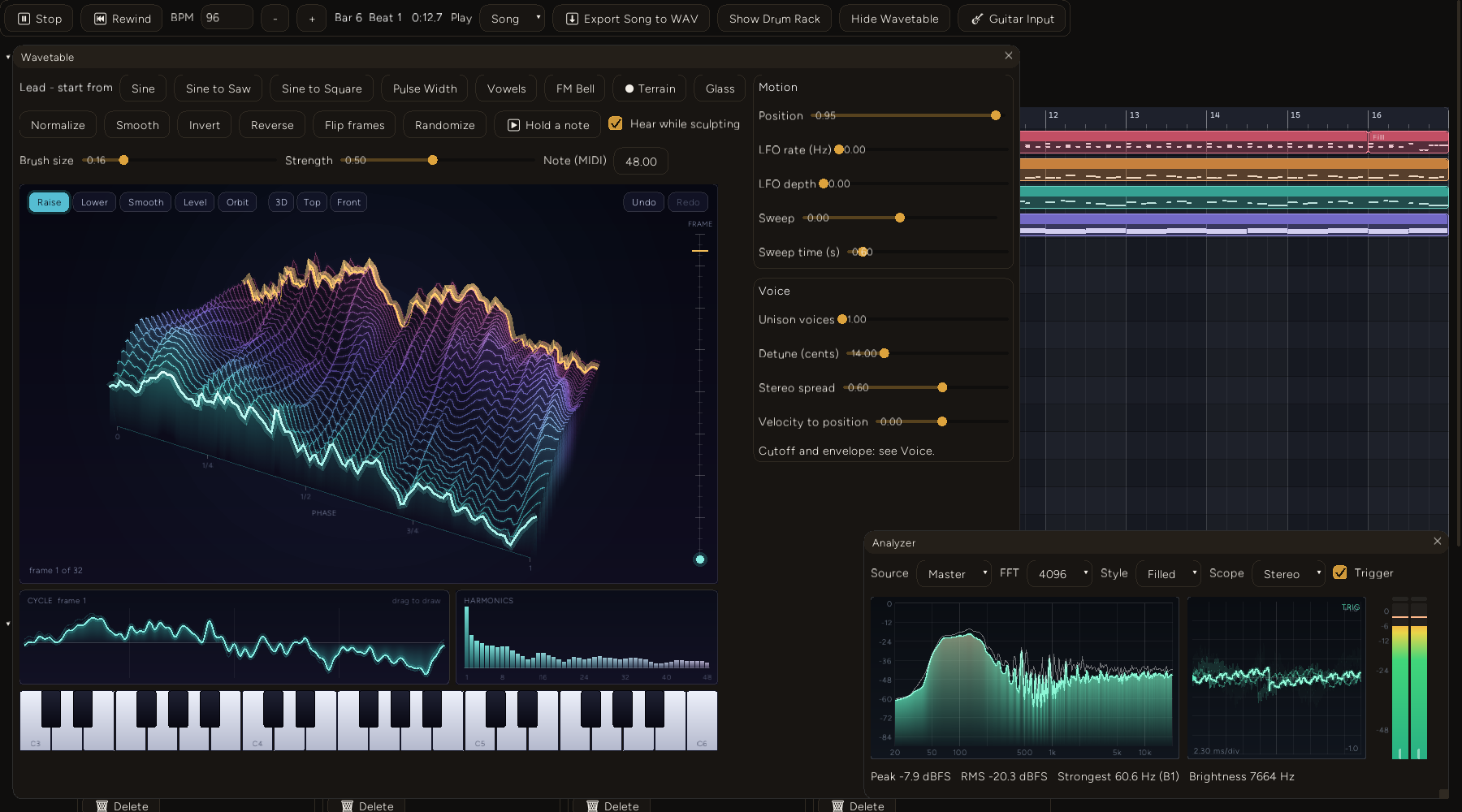
That is the real window, with the real renderer, while the song plays the lead. The amber ridge is the frame the sounding note is reading, here near the back of the table because the Position slider was at 0.95. The live run confirms that moving the position changes the sound (211 Hz of brightness at position 0.05, 1104 Hz at 0.95); this particular screenshot holds the position still.
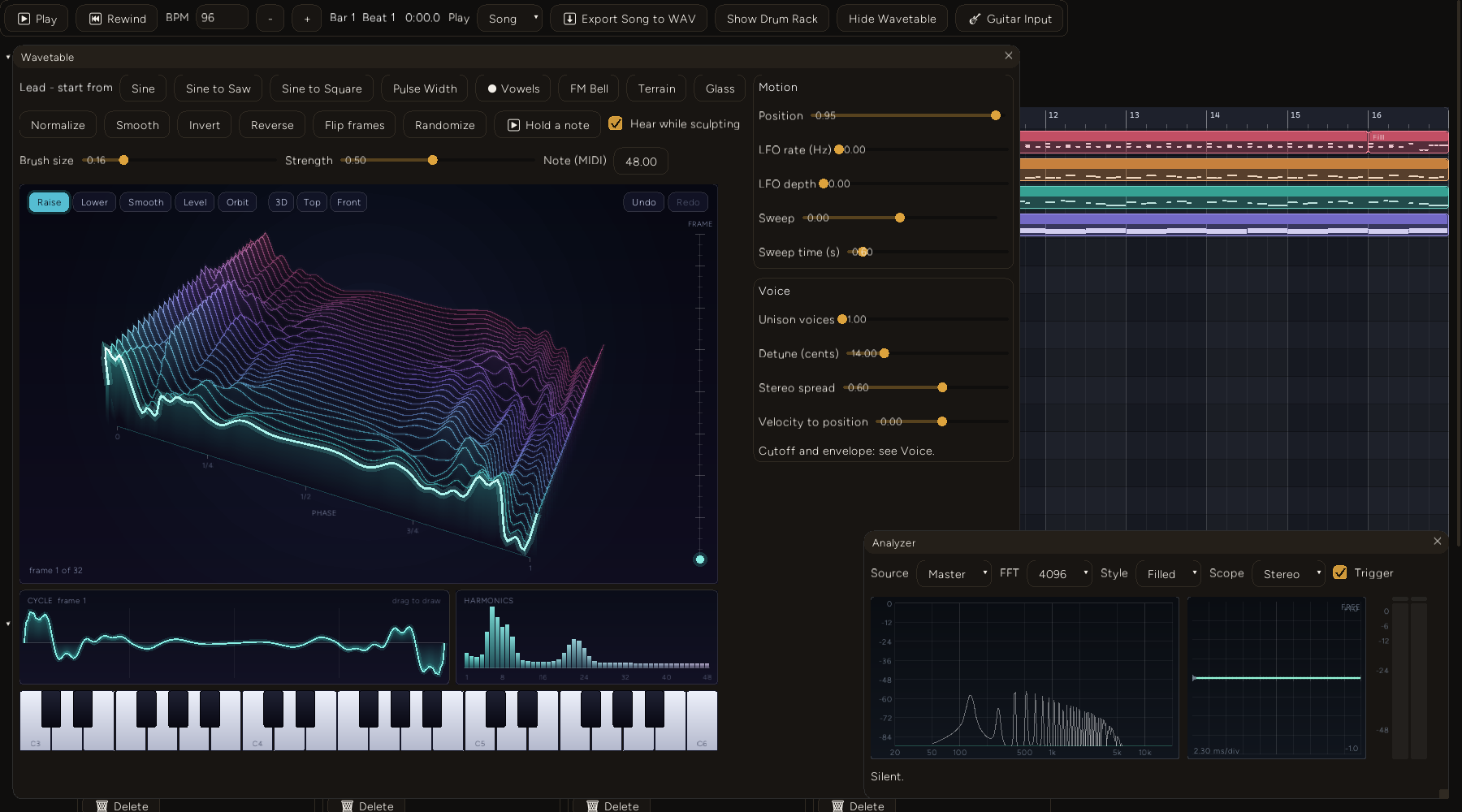
The Vowels preset is built from formant peaks, so it shows that the picture is the sound. The first frame is the vowel A at a 130 Hz fundamental, with formants near 800, 1150 and 2900 Hz, which fall near harmonics 6, 9 and 22. The harmonics panel shows exactly that: a broad hump where the first two formants merge, and a smaller one near harmonic 22.
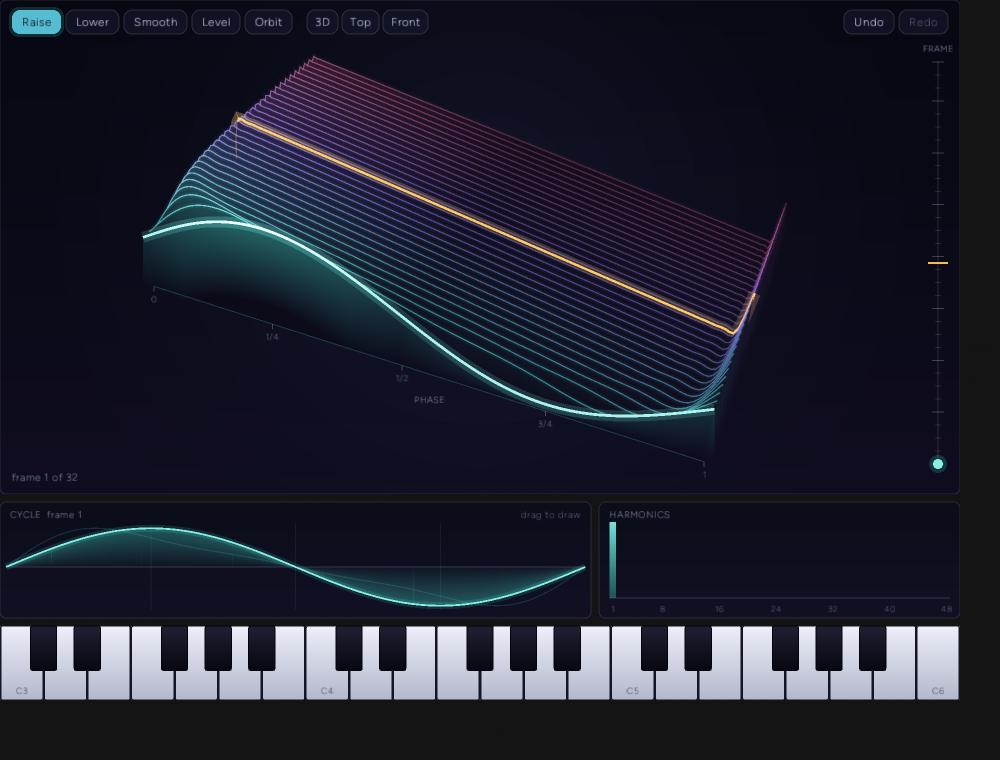
That one is the widget in the headless tier, with a voice started directly on a saw table at position 0.5. The amber ridge is the frame that voice is reading, half way through the stack, and it is straight because a saw at that morph is a ramp. The front frame is white-hot because it is the selected one.
What the live run measured
| Measurement | Value |
|---|---|
| A key pressed through the widget's real event path, C4 on the Lead's own tap | 261.8 Hz (C4 is 261.63), -22.7 dBFS |
| The Lead's tap 1.2 s after the key is released | -120 dBFS |
| A latched note at position 0.05, then 0.95, spectral centroid | 211 Hz, then 1104 Hz |
| A 220 Hz sine table, one note played offline, centroid | 221 Hz |
| The same note after a narrow spike is raised in two frames through the AI tool | 1469 Hz |
| The Vowels table at positions 0.0, 0.5, 1.0, centroid at 130.8 Hz | 1694, 1635, 1347 Hz |
| The Lead's peak over the 2.6 s of song it played through the wavetable | -17.7 dBFS |
DAW.json after the run | the Lead is a wavetable track; its table starts with the WVT1 header (base64 V1ZUM) and is 174,776 characters |
What it costs
Median of five runs of five seconds of audio for the voice, and of 15 for the rest, on the machine in the frontmatter, in a release build the bench prints as such. A second full run agreed to within about 6 percent on every line; where the table shows two figures, the second is from that run.
| Operation | Cost |
|---|---|
| One voice per output frame, no filter | 33.1 ns (34.0 on a second run), 0.15% of a 22,676 ns frame |
| One voice, filter and LFO | 82.4 ns (80.4), 0.36%, about 138 voices at 50% CPU |
| Three unison voices, filter and LFO | 107.4 ns (106.3) |
| Seven unison voices, filter and LFO | 163.8 ns (164.8), 0.72%, about 69 voices at 50% CPU |
| One raise dab or one smooth dab, radius 0.16 | 0.020 ms or 0.026 ms |
| Publishing the 9 frames that dab touches | 0.512 ms |
| Publishing the whole table | 1.842 ms |
| Loading a preset (synthesise and publish) | 2.170 ms |
| Save to base64, then load back | 0.248 ms and 2.168 ms |
| The widget, one 960 by 700 frame through a headless context (build and tessellate; no rasterizing, no GPU) | 1.213 ms (1.146), 44,832 vertices, 6.9 to 7.3% of a 60 Hz frame |
| Memory for a 32-frame table | 256 KiB of edit data plus 5.0 MiB of band-limited copies |
The real-time test is stricter than a benchmark. A counting global allocator watches only the thread that plays eight voices (unison from one to seven, timed and gated, LFOs on, half of them filtered) for five seconds, while a second thread makes brush dabs and republishes the table. In one run the second thread made 316 edits. The audio thread made 0 allocations and 0 bytes, every sample was finite, and the peak was 0.294.
Decision log
- A table type of its own, not the engine's landscape heightfield. The engine has quadtree landscape meshes with levels of detail for a 3D scene. They have no brush, they are not audio-rate (2048 samples per cycle), they are not periodic along one axis, and the audio thread cannot read a mesh without a lock. A purpose-built table costs 5 MiB of band-limited copies.
- Atomics with relaxed ordering, not a lock or a swapped pointer. I did not build the alternatives, so this is reasoning and not a comparison. A
try_lockper block would give the audio thread a reason to skip an update, and a swappedArcwould free the old table on whichever thread dropped it last, which could be the audio thread. Atomics have neither problem. The price is the splice described above, which I have not measured. - Edit in the time domain, rebuild in the frequency domain. The brush works where the picture is, on samples. A dab republishes in about half a millisecond, so there is no reason to edit spectra to keep up. It also means the drawn heights include DC that the band-limited copies drop, so a frame lifted as a whole moves in the picture and not in the speaker. Editing the harmonic bars is the obvious next step and is not built.
- Half-octave levels. An octave per level would halve the memory (2.5 MiB) and lose up to a factor of two in bandwidth at some pitches; half an octave loses at most a factor of the square root of two. I did not compare the two by ear.
- Cubic interpolation, not linear. Catmull-Rom costs eight reads per unison voice. I chose it without measuring linear interpolation against it; the nearest-sample mutation is caught, but I never tested the middle option, so I do not know whether linear would have been enough.
- Hidden lines by painter's order, not a depth buffer. The kit draws 2D triangles. Sorting ridges by camera depth and giving each an opaque curtain in the backdrop's own colours gives a solid look for 44,832 vertices a frame with no new render path.
- Aiming at a frozen surface. See the failure notes: both alternatives are wrong in a way you feel in the first second.
- A mouse presses at 0.8. A pen uses its own pressure; a mouse needs some fixed value. 0.8 is a guess I did not tune on hardware.
- Pressure scales strength and radius (
0.7 + 0.3p). So a light touch is both gentler and finer. Also untuned, and never tried on a pen.
Failure notes
A stroke aimed at a plane drifted off the cursor. The first version intersected the pointer's ray with a horizontal plane through the first touch, so a brush dragged toward a higher part of the terrain landed on the wrong cell. The Level scenario failed with the height went from 0.900 to 0.900, a fall of 0.000. Aiming at the live surface instead is worse: raising the surface moves it under the pointer, so the brush creeps toward the camera as it works. A stroke now picks against a copy of the heights taken when it began.
A ray aimed at a knife-edge peak missed it. A test that pressed exactly on a one-frame-thick spike selected frame 22 instead of 16. A probe printed the pick for the spike's own pixel and for pixels around it:
pixel (474.8, 167.3): hit frame 22.02, phase 0.4505
  offset (0,0) -> frame 22.02
  offset (0,3) -> frame 15.95
The far flank of a sharp peak falls away faster than the ray descends, so a ray aimed at its apex only grazes it and the march steps over. Three pixels lower it hits. The fix is the 0.008 tolerance, about three pixels at this size. Removing it fails the scenario.
Cucumber matches steps by keyword type. 15 steps failed with Step doesn't match any function because "I take a snapshot of the table" was defined only for When and the feature used it after Given. A step needed for both must carry both attributes.
My brightness metric could not tell a sine from a saw. The live-position unit test compared the summed absolute first difference of a sine and a saw at the same peak, and got 0.0011062867 then 0.0010800437. Total variation over one cycle is the same for both: the saw's ramp plus its jump equals the sine's climb and fall. The second difference is small for a sine and large at a saw's edge, but on interleaved stereo it still measured a first difference, because a sample of one channel and the next sample of the other are identical for a centred note. It needed one channel and a second difference.
The first hidden-line test looked in the wrong place. It measured the pixels under a hump and found a bright one: the front ridge's own line. Ridges behind a hump land above its crest on screen, not below it. The test now puts a narrow hump in the front frame, and it has a control strip in the open that must show ridge lines, or the scenario could pass on an empty picture.
op2 rejected two signatures. Failed to parse #[op2]: This op is fast-compatible and should be marked as (fast) for a function returning a bool, and Invalid return type for one returning Option<String> through #[serde].
The real window showed a bug the CPU rasterizer never could. The Motion and Voice sliders were clipped by the bottom of the window in the live screenshots. The layout is a two-column window now.
Two harness gaps. The live driver recorded the replies to I call the tool steps for every run but only wrote them into the result for the canvas tier, so the first live run failed at tool call 0: null. And a song scenario that seeked to 22.5 s measured the Lead at -120 dBFS because the Lead has no clip there; its first clip starts at 10 s.
Window stacking changes between runs. In one live run the Drum Rack drew over the Wavetable window, and in the next it drew under it. addon_engine.rs sorts the windows by id before drawing, and the id is a fresh UUID, so the order is random per launch. Hiding the Drum Rack until it is asked for removes the symptom in the DAW; the cause is on the backlog.
A repo comment contradicted the crate. stylus.rs said the windows crate does not expose the PEN_FLAG_* constants. In windows 0.58.0, the version pinned here, PEN_FLAG_BARREL, PEN_FLAG_INVERTED and PEN_FLAG_ERASER (1, 2 and 4) are defined in Win32::UI::WindowsAndMessaging; the tilt masks are not. The comment is corrected, and the code still uses literals.
Limits
- Windows only, on the machine in the frontmatter. I did not pin or log the wgpu backend or the audio host.
- No physical pen or mouse has touched this. Pressure feel, tilt direction on a real tablet, the eraser end and the side button are unverified, and
MOUSE_PRESSUREand the tilt stretch are guesses. - The mid-rebuild splice may click and I did not measure it.
- The terrain is 32 frames in the UI (the engine takes 2 to 64) and I did not check that 64 ridges read well.
- One LFO, one sweep and a velocity amount, no modulation matrix, no MPE.
- The harmonic bars only display.
- Undo is per table, 40 steps. The DAW has no undo of its own.
- The headless pictures come from a CPU rasterizer I wrote for the test. The live screenshots are the real renderer's.
- The widget's cost is CPU tessellation only. I did not measure the GPU.
- The benchmark is one machine and one process, not a criterion run.
- Nobody has listened to this, and I did not compare cubic against linear interpolation.
What's next
Tracked on the project's kanban board: a session with a real pen, dragging the harmonic bars to edit a frame, building a table from an audio file by slicing it into cycles, a modulation matrix and per-note position from MPE or the guitar input's bend, a GPU mesh for the terrain if the painter shows up in a profile, and a standalone wavetable example. The larger idea it points at is treating a Canvas Surfaces surface as a resonating body: solving its vibration modes, striking it with the stylus, and animating the mode shapes on the mesh, with the lock-free read and the brush from this post reused.